

Updated PDF (New 2024) Actual UiPath UiPath-ADAv1 Exam Questions
Verified UiPath-ADAv1 Exam Dumps PDF [2024] Access using ExamsLabs
NEW QUESTION # 50
To retrieve all Outlook emails with the word "UiPath" in the subject, which filtering property and filter schema should a developer use?
- A. Property: FilterByMessagelds
Schema: "@SQL=""urn:schemas:httpmail:subject"" like '%UiPath%"" - B. Property: FilterByMessagelds
Schema: "@SQL=""urn:schemas:httpmail:subject"" like 'UiPath%"" - C. Property: Filter
Schema: "@SQL=""urn:schemas:httpmail:subject"" like 'UiPath%"" - D. Property: Filter
Schema: "@SQL=""urn:schemas:httpmail:subject"" like '%UiPath%""
Answer: D
Explanation:
To retrieve all Outlook emails with the word "UiPath" in the subject, a developer should use the Filter property and the filter schema "@SQL=""urn:schemas:httpmail:subject"" like '%UiPath%'". The Filter property allows developers to specify a DASL query that filters the emails based on various criteria, such as subject, sender, date, etc. The filter schema "@SQL=""urn:schemas:httpmail:subject"" like '%UiPath%'" uses the SQL dialect of DASL to search for emails that have the word "UiPath" anywhere in the subject. The "%" symbol is a wildcard that matches any character or string. (UiPath Automation Developer study guide) References:
Get Outlook Mail Messages
Chapter 11: Searching Outlook Data | Microsoft Learn
NEW QUESTION # 51
What is a recommended way to safely store credential information used in a UiPath automation project?
- A. Store the username and password in a Notepad file on the robot's local machine
- B. Store the username and password in a single Orchestrator asset
- C. Store the username and password as hardcoded values with the Private option enabled on activities
- D. Store the username and password in a Config.xlsx Excel file in the Studio project folder
Answer: B
Explanation:
Storing the username and password in a single Orchestrator asset is a recommended way to safely store credential information used in a UiPath automation project. This way, the credentials are encrypted and stored in a secure location, and can be accessed by the robot at runtime. Orchestrator assets also allow for easy management and updating of the credentials without modifying the workflow. References: Assets and Managing Assets in Studio from UiPath documentation.
NEW QUESTION # 52
How should the computation of the signature be done for client apps that receive Orchestrator requests and need to check their authenticity?
Instructions: Drag the Description found on the left and drop on the correct Step Sequence found on the right.
Answer:
Explanation:
Explanation
A screenshot of a computer Description automatically generated
The correct sequence for the computation of the signature for client apps that receive Orchestrator requests and need to check their authenticity is:
Retrieve the X-UiPath-Signature HTTP header. This header contains the signature of the request body, encoded in Base64. (UiPath Orchestrator documentation1) To obtain the raw signature bytes, decode the value of the header from Base64. You can use any tool or library that supports Base64 decoding. (UiPath Orchestrator documentation1) Compute the hash using SHA256 and the signing key (UTF-8 encoded). The signing key is a secret value that is shared between Orchestrator and the client app. You can use any tool or library that supports SHA256 hashing. (UiPath Orchestrator documentation1) Compare the computed signature to the value from X-UiPath-Signature HTTP header. If they match, then the request is authentic and has not been tampered with. If they do not match, then the request is invalid and should be rejected. (UiPath Orchestrator documentation1) References:
1: Webhooks - UiPath Orchestrator.
NEW QUESTION # 53
Considering that the attached table is stored in a variable called "dt".
Which LINQ query can be used to return the maximum total Quantity?
- A. dt.AsEnumerable. Max(Function(x) Convert.Tolnt32(x("Quantity"). ToString))("Item")
- B. dt.AsEnumerable. Max(Function(x) Convert. Tolnt32(x("Quantity"). ToString))
- C. dt.AsEnumerable. OrderByDescending(Function(x) Convert. Tolnt32(x("Quantity").ToString)).First.Item("Quantity")
- D. dt.AsEnumerable. GroupBy(Function(x)x("Item"). ToString). Max(Function(x)x.Sum(Function(y) Convert.Tolnt32(y("Quantity").ToString)))
Answer: C
Explanation:
Explanation
https://docs.uipath.com/activities/docs/linq-orderbydescending
NEW QUESTION # 54
What is the use of job priorities in unattended automations within UiPath Orchestrator?
- A. To create job dependencies that must be completed before new job execution.
- B. To determine which processes should be executed first when dealing with multiple jobs.
- C. To sort and organize tasks within a folder.
- D. To determine machine resource allocation among processes.
Answer: B
Explanation:
Job priorities in unattended automations are used to assign different levels of importance to the processes that are triggered by the Orchestrator1. The job priority can be set as High, Normal, or Low when creating or editing a trigger2. The Orchestrator will execute the jobs based on their priority and the availability of robots3.
This feature helps to optimize the performance and efficiency of unattended automations.
https://forum.uipath.com/t/priority-levels-jobs-and-queue-items/273883
NEW QUESTION # 55
Which dependencies are automatically installed when a developer starts a blank process in UiPath Studio?
- A. UiPath.Python.Activities and UiPath.Word.Activities.
- B. UiPath.System.Activities, UiPath.Excel.Activities, UiPath.Mail.Activities, UiPath.UIAutomation.Activities and UiPath. Testing.Activities.
- C. UiPath.Database.Activities and UiPath.Form.Activities.
- D. UiPath.PDF.Activities and UiPath. Terminal.Activities.
Answer: B
Explanation:
When a developer starts a blank process in UiPath Studio, the following dependencies are automatically installed by default: UiPath.System.Activities, UiPath.Excel.Activities, UiPath.Mail.Activities, UiPath.UIAutomation.Activities and UiPath. Testing.Activities. These dependencies provide the basic activities and packages that are needed for most automation projects, such as working with data types, files, Excel, email, user interface, and testing. The developer can also add or remove other dependencies as needed, depending on the specific requirements of the automation project. References: Creating a Basic Process, Managing Dependencies.
NEW QUESTION # 56
A developer needs to create an array of folder names from the String variable. FilePath =
"C:\\Users\\UiPathRobot\\Documents\\Technologies". Based on best practice, which method will return an array of only the folder names?
- A. Spht(FilePath,"\": StnngSplitOptions.RemoveEmptyEntries)
- B. SplitfV, FilePath. StringSplitOptions RemoveEmptyEntries)
- C. SplitfV', FilePath)
- D. Split(FilePath/V)
Answer: A
Explanation:
To create an array of folder names from the String variable FilePath, the method that will return an array of only the folder names is:
Split(FilePath,"").StringSplitOptions.RemoveEmptyEntries
This method uses the String.Split method, which returns an array of strings that are separated by a specified delimiter. The delimiter in this case is the backslash character ("") which is used to separate the folder names in the file path. The StringSplitOptions.RemoveEmptyEntries option is used to remove any empty entries from the resulting array, such as the one before the first backslash or after the last backslash1. For example, if the FilePath variable has the value:
FilePath = "C:\Users\UiPathRobot\Documents\Technologies"
Then the method Split(FilePath,"").StringSplitOptions.RemoveEmptyEntries will return an array of four strings:
{"C", "Users", "UiPathRobot", "Documents", "Technologies"}
These are the folder names in the file path, without any empty entries.
References: String.Split Method from UiPath documentation.
NEW QUESTION # 57
What happens when closing a Remote Debugging Connection while a debugging execution is in progress?
- A. The remote robot continues the execution after Studio closes the connection.
- B. Debugging execution stops gracefully, then the connection is closed.
- C. It is not possible to close the connection while debugging is in progress.
- D. Debugging execution ends in exception, then the connection is closed.
Answer: D
Explanation:
Explanation
When you close a Remote Debugging Connection while a debugging execution is in progress, the execution is stopped abruptly and an exception is thrown on the remote robot. The connection is then closed and you are returned to the Studio interface. (Debugging in Studio - UiPath Academy) References:
Studio - Remote Debugging
Debugging in Studio - UiPath Academy
NEW QUESTION # 58
Which action can be performed from UiPath Assistant?
- A. Set reminders for processes
- B. Set text assets for processes
- C. Set queues for processes
- D. Set credential assets for processes
Answer: A
Explanation:
The action that can be performed from UiPath Assistant is setting reminders for processes. UiPath Assistant is a desktop application that allows users to view, manage, and run processes that are published from UiPath Studio or Orchestrator. UiPath Assistant also enables users to set reminders for processes that they want to execute at a specific time or date. Reminders can be added, edited, or deleted from the Reminders widget in UiPath Assistant. Reminders can also be organized into folders and configured with different options, such as recurrence, priority, or notification2. By setting reminders for processes, users can automate their tasks more efficiently and conveniently. References: UiPath Assistant and Reminders from UiPath documentation.
NEW QUESTION # 59
How would you define a linear process in UiPath?
- A. The process steps are performed only once. If the need is to process additional data, then the automation must execute again.
- B. The steps of the process refer to the execution of steps in a sequential manner, where each subsequent step depends on the successful completion of the previous step.
- C. The steps of the process are performed multiple times, but each time different data items are used.
- D. The steps of the process repeat multiple times over different data items. However, the automation design is such that each repeatable part processes independently.
Answer: A
Explanation:
Explanation
A linear process in UiPath is a type of automation process that consists of a series of steps that are executed only once for a single data item or transaction. A linear process does not have any loops or iterations, and it does not depend on any external factors or conditions. A linear process is suitable for scenarios where the automation process is simple, straightforward, and does not require any dynamic branching or decision making. (UiPath Automation Developer study guide) References:
Framework for linear process or single transaction
How to modify ReFramework to Linear Process
Difference between Linear process and Transactional process
NEW QUESTION # 60
A developer wants to create an automation in which the input from the user and pre-defined conditions determine the transition between stages. In UiPath Studio, which is the recommended type of workflow that meets the requirement?
- A. Workflow
- B. Flowchart
- C. Global Exception Handler
- D. State Machine
Answer: B
Explanation:
Explanation
A flowchart is a type of workflow that allows developers to create complex and dynamic automation processes that can branch based on user input or predefined conditions. Flowcharts use graphical elements such as shapes, connectors, and annotations to represent the flow of logic and data between different stages or activities. Flowcharts are suitable for scenarios where the automation process is not linear or sequential, but rather depends on various factors and decisions. (UiPath Automation Developer study guide) References:
Flowchart
Types of Workflows
NEW QUESTION # 61
In an RPA Testing project, you created the mock "MySequencemock" for the file "MySequence". You have to update "MySequence" and add a Log Message activity and a Verify Expression activity.
What will happen to "MySequencemock" file when you save the project, assuming that the file is closed?
- A. Only the Log Message activity will be added to the mock file.
- B. The changes made in "MySequence" workflow file are not applied to the mock file.
- C. Only the Verify Expression activity will be added to the mock file.
- D. The changes made in "MySequence" workflow file are applied to the mock file.
Answer: B
Explanation:
A mock file is a copy of a workflow file that is used to simulate the behavior of the original workflow without affecting it1. When you create a mock file, the original workflow file is automatically added to the project dependencies, and the mock file is added to the test folder2. If you update the original workflow file, the changes are not reflected in the mock file, unless you manually update the mock file as well3. Therefore, if you add a Log Message activity and a Verify Expression activity to "MySequence" workflow file and save the project, the "MySequencemock" file will remain unchanged.
References:
Mock Testing documentation from UiPath
Create Mocks documentation from UiPath
Feature request: Allow to rename Mock files forum post from UiPath Community
NEW QUESTION # 62
Once "Library A" has been imported as a dependency in the current project, how can the UI Object Repository defined in "Library A" be accessed?
- A. The Object Repository needs to be exported as a UI Library and imported in the Process for it to become available.
- B. The Object Repository will automatically be available in the Process.
- C. The Object Repository cannot be passed between a Process and a Library.
- D. The Object Repository is only available in a Library.
Answer: B
Explanation:
Explanation
The UI Object Repository is a feature that allows you to store and reuse UI elements across different automation projects1. A UI Library is a type of project that contains UI elements and workflows that can be used as dependencies in other projects2. When you import a UI Library as a dependency in your current project, the UI Object Repository defined in the UI Library will automatically be available in your current project3. You can access the UI elements from the Object Repository panel in Studio and use them in your activities4. Therefore, the correct answer is C. The other options are incorrect because they do not reflect the actual behavior of the UI Object Repository and the UI Library.
References: Object Repository documentation, Reusing Objects and UI Libraries documentation, Object Repository course, [Object Repository in Studio course].
NEW QUESTION # 63
What describes how the Excel Application Scope activity interacts with a Microsoft Excel file?
- A. Works only with xls files and Excel does not need to be installed
- B. Works only with xlsm files and Excel must be installed
- C. Works with xlsx files and Excel does not need to be installed
- D. Works with xls and xlsm files and Excel must be installed
Answer: D
Explanation:
The Excel Application Scope activity interacts with a Microsoft Excel file in the following way: it works with xls and xlsm files and Excel must be installed. The Excel Application Scope activity opens an Excel workbook and provides a scope for Excel activities. When the execution of this activity ends, the specified workbook and the Excel application are closed2. The Excel Application Scope activity can work with xls (Excel 97-2003 Workbook) and xlsm (Excel Macro-Enabled Workbook) file formats3. However, the Excel Application Scope activity requires Microsoft Excel to be installed on the machine where the automation is running, as it uses the Excel interop assembly4. Therefore, the Excel Application Scope activity cannot work with xlsx (Excel Workbook) files or without Excel installed.
References: Excel Application Scope, File formats that are supported in Excel, and Excel Application Scope - UiPath Activities Guide from UiPath documentation and Microsoft support.
NEW QUESTION # 64
A project built using REFramework pulls phone numbers from a database of employees and creates queue items for each one. Following processing, these elements must be added to a financing application. The queue item holding a phone number becomes invalid if a digit is accidentally left out because of a human mistake. As a requirement, queue items that contain partial numbers should not be accepted.
What type of error should be thrown according to best practices?
- A. Fatal Exception
- B. System Exception
- C. Application Exception
- D. Business Exception
Answer: D
NEW QUESTION # 65
Considering that the attached table is stored in a variable called "dt".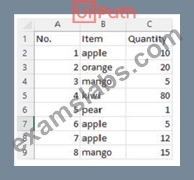
Which LINQ query can be used to return the maximum total Quantity?
- A. dt.AsEnumerable. Max(Function(x) Convert.Tolnt32(x("Quantity"). ToString))("Item")
- B. dt.AsEnumerable. OrderByDescending(Function(x) Convert. Tolnt32(x("Quantity").ToString)).First.Item("Quantity")
- C. dt.AsEnumerable. Max(Function(x) Convert. Tolnt32(x("Quantity"). ToString))
- D. dt.AsEnumerable. GroupBy(Function(x)x("Item"). ToString). Max(Function(x)x.Sum(Function(y) Convert.Tolnt32(y("Quantity").ToString)))
Answer: D
Explanation:
Explanation
This LINQ query is used to group the rows in the table by the "Item" column and then find the maximum sum of the "Quantity" column for each group. The result will be the maximum total quantity for any item in the table. (UiPath Studio documentation1) References:
1: LINQ Queries - UiPath Activities.
NEW QUESTION # 66
A developer has declared a variable of type String named StrVar and assigned it the value "UIPATH STUDIO". What is the output of the expression, StrVar.lndexOf("U")?
- A. 0
- B. 1
- C. 2
- D. 3
Answer: C
Explanation:
The IndexOf method of String values returns the index of the first occurrence of a specified character or substring in a given string. The index is zero-based, meaning that the first character has the index 0, the second character has the index 1, and so on. If the character or substring is not found, the method returns -1. In this case, the expression StrVar.IndexOf("U") returns the index of the first occurrence of the character "U" in the string "UIPATH STUDIO", which is 0. Therefore, the answer is A. 0. References: String.IndexOf Method, String Variables
NEW QUESTION # 67
A developer wants to add items to a list of strings using the Invoke Method activity. The list is declared as follows: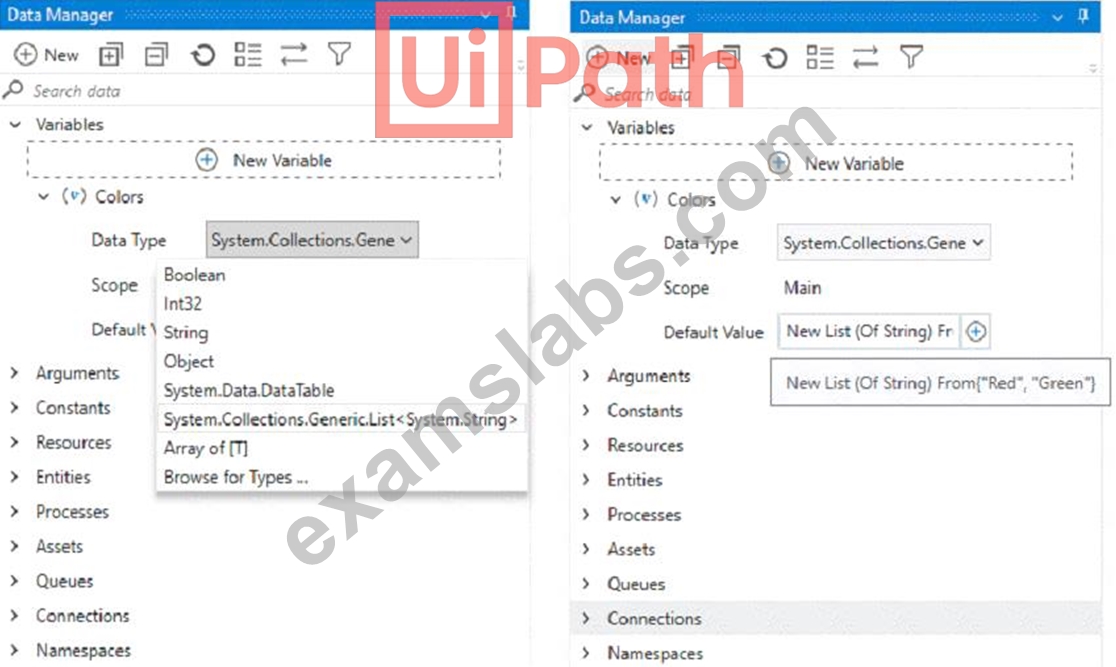
The Invoke Method includes the following properties: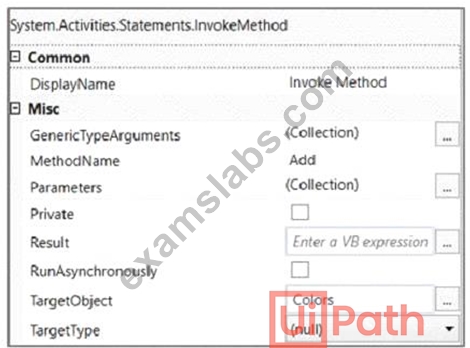
The Parameters property is as follows: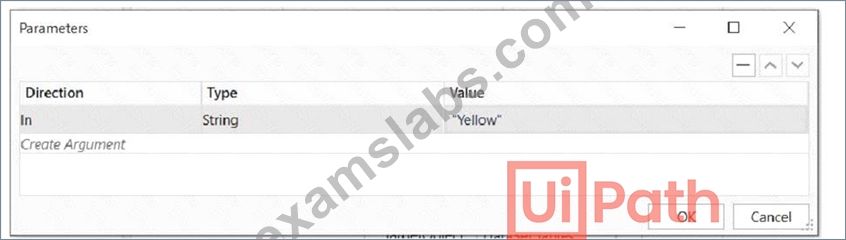
Based on the exhibits, what is the outcome of this Invoke Method activity?
- A. Colors will contain items in the following order: "Red", "Green", "Yellow".
- B. Colors will contain items in the following order: "Yellow", "Red", "Green".
- C. Colors will contain items in the following order: "Red", "Green".
- D. Invoke Method activity will throw an error.
Answer: A
Explanation:
The Invoke Method activity is used to execute a method of a class or an object1. In this case, the developer wants to add items to a list of strings using the Add method of the List class2. The list is declared as Colors and initialized with two items: "Red" and "Green". The Invoke Method activity has the following properties:
TargetObject: Colors (the list variable)
MethodName: Add (the method of the List class)
Parameters: Direction - In, Type - String, Value - "Yellow" (the item to be added to the list) Based on these properties, the Invoke Method activity will add the string "Yellow" to the end of the Colors list. Therefore, the outcome of this Invoke Method activity is that Colors will contain items in the following order: "Red", "Green", "Yellow".
Option A is incorrect because the Invoke Method activity will not throw an error, as the properties are configured correctly. Option B is incorrect because the order of the items in the list will not change, as the Add method appends the item to the end of the list. Option D is incorrect because the list will have three items, not two, as the Add method does not overwrite any existing item.
References:
Invoke Method activity documentation from UiPath
List<T>.Add(T) Method documentation from Microsoft
NEW QUESTION # 68
Review the following exhibit.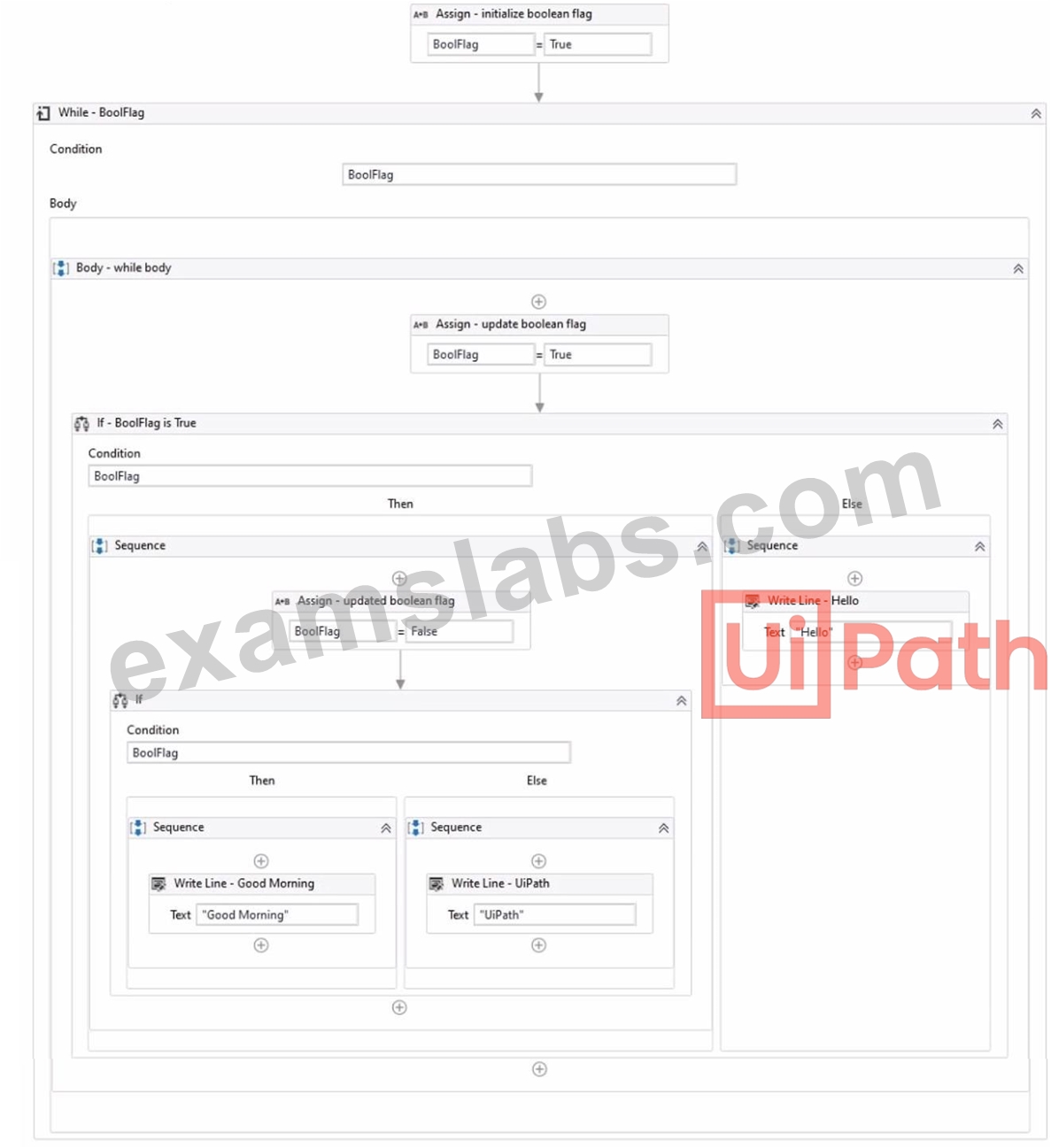
Based on the exhibit, which output is produced in the Output panel?
- A. UiPath
- B. Good Morning
- C. Good Morning UiPath
- D. Hello
Answer: B
Explanation:
Explanation
Based on the exhibit, the output produced in the Output panel is "Good Morning". This is because the "If" activity checks if the "BoolFlag" variable is True. If it is True, the "Then" branch is executed, which contains a "Write Line" activity with the text "Good Morning". If the "BoolFlag" variable is False, the "Else" branch is executed, which contains a "Write Line" activity with the text "UiPath". Since the "BoolFlag" variable is assigned to True in the previous "Assign" activity, the condition of the "If" activity is satisfied, and the "Then" branch is executed. Therefore, the "Write Line" activity writes "Good Morning" to the Output panel4. References: If and How to put a if condition in assign activity? from UiPath documentation and forum.
NEW QUESTION # 69
At indication time, the Strict Selector has the following functionalities available:
- A. Ignore text, Copy to clipboard, Show all matches.
- B. Refresh, Open in UiExplorer, Copy to clipboard.
- C. Accuracy, Open in UiExplorer, Copy to clipboard, Show all matches.
- D. Open in UiExplorer, Copy to clipboard, Show all matches.
Answer: C
Explanation:
The Strict Selector option allows you to fine-tune the selector by adjusting the accuracy level and showing all the matches in the UI Explorer. The other options are not available at indication time.
References:
Selectors in UiPath Studio course, Lesson 3: UI Explorer, Topic: Strict Selector Uipath Associate Certification UiRPA Question Latest course, Section 2: UI Automation, Lecture:
Question 10
NEW QUESTION # 70
A developer wants to add items to a list of strings using the Invoke Method activity. The list is declared as follows:
The Invoke Method includes the following properties:
The Parameters property is as follows:
Based on the exhibits, what is the outcome of this Invoke Method activity?
- A. Colors will contain items in the following order: "Red", "Green", "Yellow".
- B. Colors will contain items in the following order: "Yellow", "Red", "Green".
- C. Colors will contain items in the following order: "Red", "Green".
- D. Invoke Method activity will throw an error.
Answer: A
Explanation:
Explanation
The Invoke Method activity is used to execute a method of a class or an object1. In this case, the developer wants to add items to a list of strings using the Add method of the List class2. The list is declared as Colors and initialized with two items: "Red" and "Green". The Invoke Method activity has the following properties:
TargetObject: Colors (the list variable)
MethodName: Add (the method of the List class)
Parameters: Direction - In, Type - String, Value - "Yellow" (the item to be added to the list) Based on these properties, the Invoke Method activity will add the string "Yellow" to the end of the Colors list. Therefore, the outcome of this Invoke Method activity is that Colors will contain items in the following order: "Red", "Green", "Yellow".
Option A is incorrect because the Invoke Method activity will not throw an error, as the properties are configured correctly. Option B is incorrect because the order of the items in the list will not change, as the Add method appends the item to the end of the list. Option D is incorrect because the list will have three items, not two, as the Add method does not overwrite any existing item.
References:
Invoke Method activity documentation from UiPath
List<T>.Add(T) Method documentation from Microsoft
NEW QUESTION # 71
Consider testing a workflow that computes the sum of two numbers having the data driven test data from the Excel file below: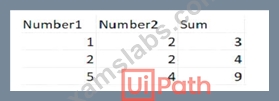
Expanding the functionality of the workflow to compute the sum of three numbers, the data needs to be updated as well to accommodate the new scenario:
What are steps to do that?
- A. Click Right on the Test Case and select Add Test Data.
- B. Click Right on the Test Case and select Remove Test Data.
- C. Click Right on the Test Case and select Refresh Test Data.
- D. Click Right on the Test Case and select Update Test Data.
Answer: D
Explanation:
Explanation
To update the data to accommodate the new scenario, you need to modify the Excel file that contains the test data and then refresh the test case to reflect the changes. The steps are as follows:
Open the Excel file that has the test data for the workflow. It should have four columns: Number1, Number2, Sum, and Result.
Add a new column after Number2 and name it Number3. This column will store the third number for the sum operation.
Update the existing rows in the Excel file to include a value for Number3 and adjust the value of Sum accordingly. For example, if Number1 is 1, Number2 is 2, and Number3 is 3, then Sum should be 6.
Save and close the Excel file.
In UiPath Studio, right click on the test case that uses the Excel file as the test data source and select Update Test Data. This will open a window where you can edit the test data settings.
In the Update Test Data window, make sure that the Excel file path is correct and that the sheet name is selected. You can also change the name and description of the test data if you want.
Click OK to save the changes and close the window.
Right click on the test case again and select Refresh Test Data. This will reload the test data from the Excel file and update the test case accordingly.
You have successfully updated the test data to compute the sum of three numbers instead of two. You can now run or debug your test case with data variations1.
NEW QUESTION # 72
What happens after executing the given sequence if the Work Items button appears on the screen after 8 seconds and the Retry Scope activity has the properties as shown in the picture?

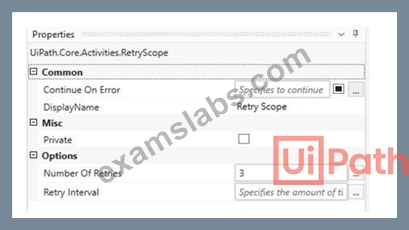
- A. The Work Items button is being highlighted.
- B. The Work Items button is being clicked.
- C. An exception is being thrown.
- D. Nothing happens.
Answer: B
Explanation:
Explanation
The Retry Scope activity is used to retry the execution of a specific part of the automation in case of an error.
In this case, the properties of the Retry Scope activity are set to retry 3 times with an interval of 8 seconds.
Therefore, if the Work Items button appears on the screen after 8 seconds, the activity will click on the button. References: [Activities - Retry Scope]
NEW QUESTION # 73
......
Try Best UiPath-ADAv1 Exam Questions from Training Expert ExamsLabs: https://www.examslabs.com/UiPath/UiPath-Certified-Professional-Developer-Track/best-UiPath-ADAv1-exam-dumps.html
Practice Examples and Dumps & Tips for 2024 Latest UiPath-ADAv1 Valid Tests Dumps: https://drive.google.com/open?id=1e6CWQoFMuw_tgCbofrka3K3HvawCB35a