

PDF Download Free of NSE5_FNC_AD_7.6 Valid Practice Test Questions
NSE5_FNC_AD_7.6 Test Engine files, NSE5_FNC_AD_7.6 Dumps PDF
Fortinet NSE5_FNC_AD_7.6 Exam Syllabus Topics:
| Topic | Details |
|---|---|
| Topic 1 |
|
| Topic 2 |
|
| Topic 3 |
|
| Topic 4 |
|
NEW QUESTION # 15
While deploying FortiNAC-F devices in a 1+1 HA configuration, the administrator has chosen to use the shared IP address option.
Which condition must be met for this type of deployment?
- A. The isolation network type is layer 3.
- B. The primary and secondary administrative interfaces are on the same subnet.
- C. The isolation network type is Layer 2.
- D. There is a direct cable link between FortiNAC-F devices.
Answer: B
Explanation:
In a 1+1 High Availability (HA) deployment, FortiNAC-F supports two primary methods for management access: individual IP addresses or a Shared IP Address (also known as a Virtual IP or VIP). The Shared IP option is part of a Layer 2 HA design, which simplifies administration by providing a single URL or IP that always points to whichever appliance is currently in the "Active" or "In Control" state.
For a Shared IP configuration to function correctly, the Primary and Secondary administrative interfaces (port1) must be on the same subnet. This requirement exists because the Shared IP is a logical address that is dynamically assigned to the physical interface of the active unit. Since only one unit can own the IP at a time, both units must reside on the same broadcast domain (Layer 2) to ensure that ARP requests for the Shared IP are correctly answered and that the gateway remains reachable regardless of which unit is active. If the appliances were on different subnets (a Layer 3 HA design), a shared IP could not be used because it cannot "float" across different network segments; instead, administrators would need to manage each unit via its unique physical IP or use a FortiNAC Manager.
"For L2 HA configurations, click the Use Shared IP Address checkbox and enter the Shared IP Address information... If your Primary and Secondary Servers are not in the same subnet, do not use a shared IP address. The shared IP address moves between appliances during a failover and recovery and requires both units to reside on the same network." - FortiNAC-F High Availability Reference Manual: Shared IP Configuration.
NEW QUESTION # 16
A user was attempting to register their host through the registration captive portal. After successfully registering, the host remained in the registration VLAN. Which two conditions would cause this behavior? (Choose two.)
- A. The wrong agent s installed.
- B. The port default VLAN is the same as the Registration VLAN.
- C. There is another unregistered host on the same port
- D. There is no agent installed on the host.
Answer: B,C
Explanation:
The process of moving a host from a Registration VLAN to a Production VLAN (Access VLAN) is a fundamental part of the FortiNAC-F "VLAN steering" workflow. When a host successfully registers via the captive portal, FortiNAC-F evaluates its Network Access Policies to determine the correct VLAN. If the host remains stuck in the Registration VLAN despite a successful registration, it is typically due to port-level restrictions or the presence of other unregistered devices.
The two most common reasons for this behavior as per the documentation are:
The port default VLAN is the same as the Registration VLAN: If the "Default VLAN" field in the switch port's model configuration is set to the same ID as the Registration VLAN, the port will not change state because FortiNAC-F believes it is already in its "normal" or "forced" state.
There is another unregistered host on the same port: FortiNAC-F maintains the security posture of the physical port. If multiple hosts are connected to a single port (e.g., via a hub or unmanaged switch) and at least one host remains "Rogue" (unregistered), FortiNAC-F will generally keep the entire port in the isolation/registration VLAN to prevent the unregistered host from gaining unauthorized access to the production network.
Issues with agents (A, B) typically prevent a host from completing compliance or registration but do not usually result in a "stuck" status after registration has already been marked as successful in the system.
"If a port is identified as having Multiple Hosts, and those hosts require different levels of access, FortiNAC remains in the most restrictive state (Registration or Isolation) until all hosts on that port are authorized... Additionally, verify the Default VLAN setting for the port; if the Default VLAN and Registration VLAN match, the system will not trigger a VLAN change upon registration." - FortiNAC-F Administration Guide: Troubleshooting Host Management.
NEW QUESTION # 17
When configuring isolation networks in the configuration wizard, why does a layer 3 network typo allow for mora than ono DHCP scope for each isolation network typo?
- A. Any scopes beyond the first scope are used if the initial scope runs out of IP addresses.
- B. There can be more than one isolation network of each type
- C. The layer 3 network type allows for one scope for each possible host status.
- D. Configuring more than one DHCP scope allows for DHCP server redundancy
Answer: B
Explanation:
In FortiNAC-F, theLayer 3 Network typeis specifically designed for deployments where the isolation networks-such as Registration, Remediation, and Dead End-are separated from the FortiNAC appliance ' s service interface (port2) by one or more routers. This architecture is common in large, distributed enterprise environments where endpoints in different physical locations or branches must be isolated into subnets that are local to their respective network equipment.
The reason the Configuration Wizard allows for more than one DHCP scope for a single isolation network type (state) is thatthere can be more than one isolation network of each typeacross the infrastructure. For instance, if an organization has three different sites, each site might require its own unique Layer 3 registration subnet to ensure efficient routing and to accommodate local IP address management. By allowing multiple scopes for the " Registration " state, FortiNAC can provide the appropriate IP address, gateway, and DNS settings to a rogue host regardless of which site ' s registration VLAN it is placed into.
When an endpoint is isolated, the network infrastructure (via DHCP Relay/IP Helper) directs the DHCP request to the FortiNAC service interface. FortiNAC then identifies which scope to use based on the incoming request ' s gateway information. This flexibility ensures that the system is not limited to a single flat subnet for each isolation state, supporting a scalable, multi-routed network topology.
" Multiple scopes are allowed for each isolation state (Registration, Remediation, Dead End, VPN, Authentication, Isolation, and Access Point Management). Within these scopes, multiple ranges in the lease pool are also permitted... This configWizard option is used when Isolation Networks are separated from the FortiNAC Appliance ' s port2 interface by a router. " -FortiNAC-F Configuration Wizard Reference Manual:
Layer 3 Network Section.
NEW QUESTION # 18
How can an administrator configure FortiNAC-F to normalize incoming syslog event levels across vendors?
- A. Configure the vendor OUI settings.
- B. Configure the security rule settings.
- C. Configure event to alarm mappings.
- D. Configure severity mappings.
Answer: D
Explanation:
FortiNAC-F serves as a central manager for security events originating from a diverse ecosystem of third-party security appliances, such as FortiGate, Check Point, and Cisco. Each vendor utilizes its own internal scale for severity levels within syslog messages (e.g., Check Point uses a 1-5 scale, while others may use 0-7). To provide a consistent response regardless of the source, FortiNAC-F uses Severity Mappings to normalize these incoming values.
According to the FortiNAC-F Administration Guide, severity mappings allow the administrator to translate vendor-specific threat levels into standardized FortiNAC Security Levels (such as High, Medium, or Low Violation). When a syslog message arrives, the parser extracts the vendor's severity code, and the system immediately references the Security Event Severity Level Mappings table to determine how that event should be categorized internally. This normalization is vital because it allows a single Security Alarm to be configured to respond to any "High Violation" event, whether it was reported as a "Critical" by one vendor or a "Level 5" by another. Without these mappings, the administrator would have to create separate, redundant security rules for every vendor to account for their different naming conventions and numerical scales.
"Each vendor defines its own severity levels for syslog messages. The following table shows the equivalent FortiNAC security level... To normalize these events, configure the Severity Level Mappings found in the device integration guides. This allows FortiNAC to generate a consistent security event that can then trigger an alarm regardless of the reporting vendor's specific terminology." - FortiNAC-F Administration Guide: Vendor Severity Levels and Syslog Management.
NEW QUESTION # 19
Refer to the exhibits.
What would happen if the highlighted port with connected hosts was placed in both the Forced Registration and Forced Remediation port groups?
- A. Only the higher ranked enforcement group would be applied.
- B. Multiple enforcement groups could not contain the same port.
- C. Both types of enforcement would be applied
- D. Enforcement would be applied only to rogue hosts
Answer: A
Explanation:
In FortiNAC-F,Port Groupsare used to apply specific enforcement behaviors to switch ports. When a port is assigned to an enforcement group, such asForced RegistrationorForced Remediation, FortiNAC-F overrides normal policy logic to force all connected adapters into that specific state. The exhibit shows a port (IF#13) with " Multiple Hosts " connected, which is a common scenario in environments using unmanaged switches or hubs downstream from a managed switch port.
According to theFortiNAC-F Administrator Guide, it is possible for a single port to be a member of multiple port groups. However, when those groups have conflicting enforcement actions-such as one group forcing a registration state and another forcing a remediation state-FortiNAC-F utilizes aranking systemto resolve the conflict. In the FortiNAC-F GUI underNetwork > Port Management > Port Groups, each group is assigned a rank. The system evaluates these ranks, andonly the higher ranked enforcement group is appliedto the port. If a port is in both a Forced Registration group and a Forced Remediation group, the group with the numerical priority (rank) will dictate the VLAN and access level assigned to all hosts on that port.
This mechanism ensures consistent behavior across the fabric. If the ranking determines that " Forced Registration " is higher priority, then even a known host that is failing a compliance scan (which would normally trigger Remediation) will be held in the Registration VLAN because the port-level enforcement takes precedence based on its rank.
" A port can be a member of multiple groups. If more than one group has an enforcement assigned, the group with thehighest rank(lowest numerical value) is used to determine the enforcement for the port. When a port is placed in a group with an enforcement, that enforcement is applied toall hostsconnected to that port, regardless of the host ' s current state. " -FortiNAC-F Administration Guide: Port Group Enforcement and Ranking.
NEW QUESTION # 20
Which two actions must the administrator perform to allow FortiNAC-F to process incoming syslog messages from an unknown vendor? (Choose two.)
- A. The device must have an event parser created for it.
- B. The device sending the messages must be modeled in the Network Inventory view.
- C. The device must be added as a server in the Host view.
- D. The device must be added as a log receiver in FortiNAC-F.
Answer: A,B
Explanation:
The correct answers are A and B . For FortiNAC-F to process syslog messages from a vendor that is not already known, it needs a parser so it can understand the message structure. The study guide describes this under syslog integration: syslog files must be created, and FortiNAC-F parses CSV, CEF, or tag/value messages by using column mapping or tag-to-value mapping. That parser is what allows FortiNAC-F to extract the correct event information from the incoming message.
The sending device must also be modeled in the Inventory view, normally as a pingable device, and its Incoming Events setting must be set to Syslog with the appropriate parser selected. The guide is blunt on this point: FortiNAC-F does not process syslog or trap messages unless the source address belongs to a modeled device.
Option C is wrong because adding the device as a server in the Host view does not prepare FortiNAC-F to parse syslog input. Option D is also wrong because log receivers are for sending FortiNAC-F event or alarm information out to external systems such as FortiAnalyzer, SIEM, or a syslog server, not for receiving and parsing unknown-vendor syslog messages.
NEW QUESTION # 21
Refer to the exhibit.
What will happen to the host of a guest user created from this template if the time of connection is 8:00 PM?
- A. The host will be marked as at-risk.
- B. The host will be marked as non-authenticated.
- C. The host will be administratively disabled.
- D. The host will be marked as a rogue device.
Answer: B
Explanation:
In FortiNAC-F, theGuest & Contractor Templateis a configuration object that defines the parameters for accounts created by sponsors or through self-registration. One of the critical security controls within this template is theLogin Availabilitysetting. This setting restricts the specific days and times during which a guest or contractor is permitted to authenticate and access the network.
As shown in the exhibit, the " StandardGuest " template hasLogin Availabilityset to " Specify Time " , with a schedule defined asMon-Fri, 6:00 AM to 7:00 PM. If a guest user attempts to connect or authenticate at8:00 PM, which is outside of the permitted window, FortiNAC-F ' s policy engine will automatically deny the authentication request. When an authentication attempt is denied due to schedule restrictions, the system does not move the host into the " Authenticated " or " Registered " state required for production access. Instead, the host ismarked as non-authenticatedin the adapter or host view.
This behavior ensures that even if a guest possesses valid credentials, their access is strictly bound by the organizational policy for visitor hours. The host will typically remain in its current isolation or registration VLAN, and the user will see a message on the captive portal indicating that their account is not currently authorized for login. It is important to distinguish this from " at-risk " (C), which relates to security scan failures, or " rogue " (B), which typically refers to unknown devices that have not yet been associated with a valid account or profiling rule.
" Login Availabilitydefines the timeframe during which the guest or contractor account is valid for network access. This schedule is enforced at the time of authentication. If a user attempts to log in outside of the designated window, the authentication is rejected by the system. Consequently, the host record will reflect anon-authenticatedstatus, and the device will remain restricted to the isolation or registration network until a valid login window is reached. " -FortiNAC-F Administration Guide: Guest and Contractor Templates Section.
NEW QUESTION # 22
Which two requirements must be met to set up an N+1 HA cluster? (Choose two.)
- A. At least two FortiNAC-F devices designated as primary
- B. A FortiNAC-F manager
- C. A dedicated VLAN for primary and secondary synchronization
- D. A FortiNAC-F device designated as a secondary
Answer: B,D
Explanation:
The N+1 High Availability (HA) architecture was introduced in FortiNAC-F version 7.6 to provide a more scalable and flexible redundancy model compared to the traditional 1+1 active/passive setup. In an N+1 configuration, a single secondary (standby) appliance can provide coverage for multiple primary (active) Control and Application (CA) appliances.
To set up an N+1 HA cluster, there are two fundamental structural requirements:
A FortiNAC-F Manager (FortiNAC-M): Unlike standard 1+1 HA, which can be configured directly between two CAs, N+1 management is centralized. The FortiNAC-M acts as the orchestrator that manages the failover groups, monitors the health of the primaries, and coordinates the promotion of the secondary server if a primary fails.
A FortiNAC-F device designated as a Secondary: The cluster must have one appliance explicitly configured with the Secondary failover role. This device remains in a standby state, receiving database replications from all N primaries in its group until it is called upon to take over the functions of a failed unit.
While a cluster can support multiple primaries (D), it does not strictly require "at least two" to function as an N+1 group; it simply requires N primaries (where N ≥ 1). Additionally, N+1 is typically a Layer 3 managed solution via the Manager, meaning it does not mandate a "dedicated VLAN" for synchronization like some Layer 2 HA deployments.
"In FortiNAC-F 7.6, FortiNAC-M functions as a manager to manage the N+1 Failover Groups... enabling N+M high availability for CAs. To create an N+1 Failover group, you should add the secondary CA to the FortiNAC-M first, then add the primary CAs. The secondary CA is designed to take over the functionality of any single failed primary component." - FortiNAC-F 7.6.0 N+1 Failover Reference Manual.
NEW QUESTION # 23
Refer to the exhibit.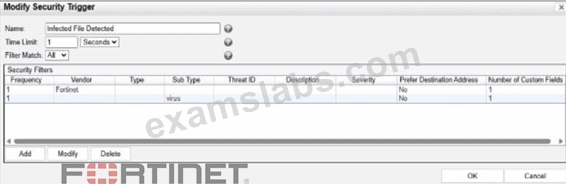
What would FortiNAC-F generate if only one of the security fitters is satisfied?
- A. A normal alarm
- B. A normal event
- C. A security alarm
- D. A security event
Answer: B
Explanation:
In FortiNAC-F,Security Triggersare used to identify specific security-related activities based on incoming data such as Syslog messages or SNMP traps from external security devices (like a FortiGate or an IDS).
These triggers act as a filtering mechanism to determine if an incoming notification should be escalated from a standard system event to aSecurity Event.
According to theFortiNAC-F Administrator Guideand relevant training materials for versions 7.2 and 7.4, theFilter Matchsetting is the critical logic gate for this process. As seen in the exhibit, the " Filter Match " configuration is set to " All " . This means that for the Security Trigger named " Infected File Detected " to " fire " and generate a Security Event or a subsequent Security Alarm,every single filterlisted in the Security Filters table must be satisfied simultaneously by the incoming data.
In the provided exhibit, there are two filters: one looking for the Vendor " Fortinet " and another looking for the Sub Type " virus " . If only one of these filters is satisfied (for example, a message from Fortinet that does not contain the " virus " subtype), the logic for the Security Trigger is not met. Consequently, FortiNAC-F does not escalate the notification. Instead, it processes theincoming data as aNormal Event, which is recorded in the Event Log but does not trigger the automated security response workflows associated with security alarms.
" The Filter Match option defines the logic used when multiple filters are defined. If ' All ' is selected, then all filter criteria must be met in order for the trigger to fire and aSecurity Eventto be generated. If the criteria are not met, the incoming data is processed as anormal event. If ' Any ' is selected, the trigger fires if at least one of the filters matches. " -FortiNAC-F Administration Guide: Security Triggers Section.
NEW QUESTION # 24
As part of a company policy, all end stations must be scanned for compliance each day. The security administrators want to satisfy this requirement without any necessary interaction from the end user. Which two agents can provide that functionality? (Choose two.)
- A. Mobile
- B. Persistent
- C. Dissolvable
- D. Passive
Answer: B,D
Explanation:
The correct answers are B and C . The persistent agent is the strongest fit because it is installed and stays resident on the endpoint. The study guide states that after deployment, the persistent agent communicates back to FortiNAC-F every 15 minutes and performs scheduled scans in the background, transparent to the end user. That directly satisfies the requirement for recurring compliance scans without user involvement.
The passive agent can also scan Windows domain end stations without end-user interaction. The guide states that the passive agent is deployed through login/logoff scripts and administrative templates, and that passive agent registration can register and scan hosts associated with LDAP or Active Directory users. If enabled, the passive agent scans the host to verify compliance with the appropriate endpoint policy.
Option A is wrong because the dissolvable agent is a run-once agent that requires manual end-user interaction in the captive portal, then removes itself after reporting results. Option D is not the best answer for this requirement because the mobile agent is specifically for Android onboarding and is manually installed; it is not the general solution for daily compliance scanning of all end stations.
NEW QUESTION # 25
During an evaluation of state-based enforcement, an administrator discovers that ports that should not be under enforcement have been added to enforcement groups.
In which view would the administrator be able to identify who added the ports to the groups?
(Selected)
- A. The Admin Auditing view
- B. The Event Management view
- C. The Security Events view
- D. The Port Changes view
Answer: A
Explanation:
In FortiNAC-F, accountability and forensic tracking of configuration changes are managed through the Admin Auditing functionality. When an administrator performs an action that modifies the system state-such as creating a policy, changing a device's status, or adding a switch port to an Enforcement Group-the system generates an audit record. This record is essential for troubleshooting scenarios where unauthorized or accidental configuration changes have occurred, leading to unintended network behavior.
The Admin Auditing view (found under Logs > Admin Auditing) provides a comprehensive log of the "Who, What, and When" for every administrative session. Each entry includes the username of the administrator, the source IP address from which they accessed the FortiNAC-F console, a precise timestamp, and a detailed description of the modification. In the scenario described, where ports have been incorrectly added to enforcement groups, the Admin Auditing view allows a supervisor to filter by the specific "Port" or "Group" object to identify exactly which administrator executed the command.
In contrast, the Event Management view (B) is designed to monitor system and network events, such as RADIUS authentications, host connections, and SNMP trap arrivals. While it tracks system activity, it does not typically log the manual configuration changes performed by admins. The Port Changes view (C) tracks the operational history of a port (such as VLAN assignment changes and host movements) but does not attribute the administrative assignment of the port to a group. Finally, the Security Events view (D) is dedicated to alerts triggered by security rules and external threat feeds.
"Admin Auditing displays a record of all modifications made to the FortiNAC-F system by an administrator. This view includes the administrator's name, the date and time of the change, and a description of the action taken. It is the primary resource for determining which administrative user performed a specific configuration change, such as modifying port group memberships or altering policy settings." - FortiNAC-F Administration Guide: Logging and Auditing Section.
NEW QUESTION # 26
Refer to the exhibit.
When configuring guest access using a network access policy, where would an administrator configure the Guest-VLAN value?
- A. In the User/Host profile
- B. In the Guest template
- C. In the Model configuration
- D. in the Guest portal configuration
Answer: C
Explanation:
The correct answer is A . In the exhibit, Guest-VLAN is selected as the network access policy Configuration
. That policy configuration points to a logical network, but the actual access value for that logical network is not defined inside the guest template, user/host profile, or guest portal. The FortiNAC-F study guide explains that logical networks translate policy-level names into device-specific access values, and those values are configured in the Model Configuration of the infrastructure device. It specifically states that device-specific configurations for infrastructure devices associate the configuration values with the devices, and that after a logical network is created, it appears within the model configuration of each modeled infrastructure device.
So, Guest-VLAN is the logical network selected by the network access policy, while the actual VLAN ID, VLAN name, SSID role, controller group, or vendor-specific access value is configured under the relevant switch, AP, controller, or firewall Model Configuration . Option B is wrong because the guest template defines guest account properties such as role, security/access value, password settings, account duration, and login availability. Option C is wrong because the user/host profile defines the matching condition for guests.
Option D is wrong because the guest portal controls onboarding or login behavior, not the infrastructure access value used to provision the endpoint.
NEW QUESTION # 27
In which three ways would deploying a FortiNAC-F Manager into a large environment consisting of several FortiNAC-F CAs simplify management? (Choose three.)
- A. Global infrastructure device inventory
- B. Global authentication security policies
- C. Global visibility
- D. Pooled licenses
- E. Global version control
Answer: C,D,E
Explanation:
TheFortiNAC-F Manager (FortiNAC-M)is designed as a centralized management platform for large-scale distributed environments where multiple FortiNAC-F Control and Application (CA) appliances are deployed across different sites. According to theFortiNAC-F Manager Administration Guide, the deployment of a Manager simplifies administrative overhead in three specific ways:
First, it providesGlobal Version Control (B). The Manager serves as a central repository for firmware and software updates, allowing administrators to push specific versions to all managed CAs simultaneously, ensuring consistency across the entire fabric. Second, it enablesPooled Licenses (D). Instead of purchasing and managing individual licenses for every CA, licenses are centralized on the Manager. The Manager then distributes these licenses to the CAs as needed based on their host counts. This " floating " license model optimizes cost and prevents individual sites from running out of capacity while others have excess. Third, it offersGlobal Visibility (E). The Manager aggregates host and device data from every managed CA into a single console. This " single pane of glass " allows an administrator to search for a specific MAC address or user across the entire global organization without logging into individual servers.
While the Manager can assist with configuration templates, authentication security policies (C) and infrastructure modeling (A) are still predominantly managed at the local CA level to ensure site-specific logic and performance.
" The FortiNAC Manager provides a central management console for multiple FortiNAC-F servers (CAs).
Key benefits include: *License Management: Licenses are pooled on the Manager and allocated to managed CAs as needed. *Software Management: Firmware updates can be centrally managed and pushed to all CAs from the Manager. *Centralized Monitoring: Provides a global view of all hosts, adapters, and events across the entire managed environment. " -FortiNAC-F Manager Administration Guide: Overview and Benefits.
NEW QUESTION # 28
When working with a FortiNAC-F Manager and cluster management, what will occur when a cluster manager recovers from a non-responsive state?
- A. It rejoins the cluster as a worker node.
- B. It will be removed from the cluster and placed in a standalone group.
- C. It will perform a health check and be demoted to standby.
- D. It automatically returns to the manager state.
Answer: A
Explanation:
The correct answer is C . In FortiNAC-F Manager clustering, the active cluster management role is the leader role, and other cluster members operate as worker nodes. Fortinet's FortiNAC-F 7.6 Manager Cluster Guide states that when a worker is promoted to leader during automatic transition, the original leader becomes a worker node when it comes back online. It also explains that a cluster has one leader and can have multiple workers, with leader/worker roles used for cluster management and heartbeat exchange.
So, if the cluster manager becomes non-responsive and another node takes over leadership, the recovered manager does not automatically reclaim the leader role. It rejoins as a worker node. Option A is wrong because recovery does not automatically remove it into a standalone group. Option B is wrong because automatic return to the previous manager/leader state would create instability and possible split-brain behavior. Option D is wrong because "standby" is not the role described for FortiNAC-F Manager clustering in this context; the documented cluster roles are leader and worker.
NEW QUESTION # 29
An administrator manages a corporate environment where all users log into the corporate domain each time they connect to the network. The administrator wants to leverage login scripts to use a FortiNAC-F agent to enhance endpoint visibility Which agent can be deployed as part of a login script?
- A. Mobile
- B. Passive
- C. Persistent
- D. Dissolvable
Answer: C
Explanation:
In a corporate domain environment where "enhanced endpoint visibility" is required, the Persistent Agent is the recommended choice. Unlike the Dissolvable Agent, which is temporary and intended for one-time compliance scans during registration, the Persistent Agent is an "install-and-stay-resident" application.
The Persistent Agent is specifically designed to be distributed through automated enterprise methods, including login scripts, Group Policy Objects (GPO), or third-party software management tools. When deployed via a login script, the agent can be configured to silently install and immediately begin communicating with the FortiNAC-F service interface. Once active, it provides continuous visibility by reporting host details such as logged-on users, installed applications, and adapter information. It also listens for Windows session events (logon/logoff) to trigger automatic single-sign-on (SSO) registration in FortiNAC-F, ensuring that as soon as a user connects to the domain, their device is identified and assigned the correct network access policy.
"The Persistent Agent can be distributed to Windows domain machines via login script or by any other software distribution method your organization might use. The Persistent Agent remains installed on the host at all times. Once the agent is installed it runs in the background and communicates with FortiNAC at intervals established by the FortiNAC administrator." - FortiNAC-F Administration Guide: Persistent Agent Overview.
NEW QUESTION # 30
In which three ways would deploying a FortiNAC-F Manager into a large environment consisting of several FortiNAC-F CAs simplify management? (Choose three.)
- A. Global infrastructure device inventory
- B. Global authentication security policies
- C. Global visibility
- D. Pooled licenses
- E. Global version control
Answer: C,D,E
Explanation:
The FortiNAC-F Manager (FortiNAC-M) is designed as a centralized management platform for large-scale distributed environments where multiple FortiNAC-F Control and Application (CA) appliances are deployed across different sites. According to the FortiNAC-F Manager Administration Guide, the deployment of a Manager simplifies administrative overhead in three specific ways:
First, it provides Global Version Control (B). The Manager serves as a central repository for firmware and software updates, allowing administrators to push specific versions to all managed CAs simultaneously, ensuring consistency across the entire fabric. Second, it enables Pooled Licenses (D). Instead of purchasing and managing individual licenses for every CA, licenses are centralized on the Manager. The Manager then distributes these licenses to the CAs as needed based on their host counts. This "floating" license model optimizes cost and prevents individual sites from running out of capacity while others have excess. Third, it offers Global Visibility (E). The Manager aggregates host and device data from every managed CA into a single console. This "single pane of glass" allows an administrator to search for a specific MAC address or user across the entire global organization without logging into individual servers.
While the Manager can assist with configuration templates, authentication security policies (C) and infrastructure modeling (A) are still predominantly managed at the local CA level to ensure site-specific logic and performance.
"The FortiNAC Manager provides a central management console for multiple FortiNAC-F servers (CAs). Key benefits include: * License Management: Licenses are pooled on the Manager and allocated to managed CAs as needed. * Software Management: Firmware updates can be centrally managed and pushed to all CAs from the Manager. * Centralized Monitoring: Provides a global view of all hosts, adapters, and events across the entire managed environment." - FortiNAC-F Manager Administration Guide: Overview and Benefits.
NEW QUESTION # 31
Refer to the exhibits.


An administrator is troubleshooting visibility issues on a modeled switch The switch is configured to use link traps and to provision hosts based on network access policies. The administrator is seeing hosts on ports with no hosts connected and not seeing hosts on ports where hosts are known to be connected.
What is the most likely cause?
- A. The credentials are incorrect.
- B. The switch cannot be contacted by FortiNAC-F
- C. The host has uninstalled the FortiNAC-F agent.
- D. The logical networks are set to deny.
Answer: B
Explanation:
The correct answer is C . In a link-trap-based wired deployment, the switch sends a linkUp or linkDown SNMP trap to FortiNAC-F, but that trap does not contain the endpoint MAC address. After receiving the link trap, FortiNAC-F must contact the switch and perform a Layer 2 poll to read the forwarding table and determine which MAC address was added or removed on the port. The FortiNAC-F study guide states that link traps trigger FortiNAC-F to perform a Layer 2 poll to update its awareness of devices connected to the edge device, and the wired link-trap workflow specifically shows FortiNAC-F performing a Layer 2 poll before locating the host record and provisioning access.
The symptoms in the exhibit are classic stale Layer 2 visibility: FortiNAC-F still shows a rogue host on a port where no host is connected, while also failing to show hosts on ports where endpoints are actually connected.
That means FortiNAC-F is not successfully refreshing the switch MAC table information. Since link traps depend on FortiNAC-F being able to poll the switch after the trap, a contact failure with the modeled switch is the most likely cause.
Option A is wrong because logical network settings affect access enforcement, not whether FortiNAC-F can see current MAC-to-port mappings. Option B is wrong because the FortiNAC-F agent is not required for basic switch-port visibility; Layer 2 visibility comes from switch polling, MAC notification traps, or RADIUS. Option D is tempting, but the broader failure shown here is not merely a policy or endpoint-side issue-it is that FortiNAC-F cannot obtain current Layer 2 data from the switch. In practice, you would still verify SNMP/CLI credentials while troubleshooting, but the best answer to the symptom pattern is that FortiNAC-F cannot contact/query the switch successfully.
NEW QUESTION # 32
Refer to the exhibits.

Based on the given configurations and settings, on which date and time would a guest account created at 8:00 AM on 2025/09/12 expire?
- A. 2025/09/12 at 17:00:00
- B. 2025/09/12 at 7:00 PM
- C. 2025/09/13 at 17:00:00
- D. 2025/09/12 at 8:00 PM
Answer: C
Explanation:
Questio ns no: 22
Verified Answe r: D
Comprehensive and Detailed 250 to 300 words each Explanation with Exact Matched Extract from FortiNAC-F Administrator library and documentation for current versions (including F 7.2, 7.4, and 7.6) documents:
In FortiNAC-F, the expiration of a guest or contractor account is determined by the configuration settings within the Account Creation Wizard and the associated Guest/Contractor Template. While a template can define a default "Account Duration" (as seen in the 12-hour setting in the second exhibit), the Account Creation Wizard allows an administrator to manually specify or override the start and end parameters for a specific user session.
According to the FortiNAC-F Administration Guide regarding guest management, the Account End Date field in the creation wizard is the definitive timestamp for when the account object will be disabled or deleted from the system. In the provided exhibit (Account Creation Wizard), the administrator has explicitly set the Account Start Date to 2025/09/12 08:00:00 and the Account End Date to 2025/09/13 17:00:00.
Even though the template indicates an "Account Duration" of 12 hours, this value typically serves as a pre-populated default. When a manual date and time are entered into the wizard, those specific values take precedence for that individual account. The account will remain active and valid until 5:00 PM (17:00:00) on the following day, 2025/09/13. It is also important to note the "Login Availability" from the template (8:00 AM - 7:00 PM); while the account exists until the 13th at 17:00:00, the user would only be able to authenticate during the active hours defined by the login schedule on both days.
"When creating an account, the administrator can select a template to provide default settings. However, specific values such as the Account End Date can be modified within the Account Creation Wizard. The date and time specified in the 'Account End Date' field determines the absolute expiration of the account. Once this time is reached, the account is moved to an expired state and the user's network access is revoked." - FortiNAC-F Administration Guide: Guest and Contractor Account Management.
NEW QUESTION # 33
A network administrator is troubleshooting a network access issue for a specific host. The administrator suspects the host is being assigned a different network access policy than expected.
Where would the administrator look to identify which network access policy, if any, is being applied to a particular host?
- A. The Connections view
- B. The Port Properties view of the hosts port
- C. The Policy Details view for the host
- D. The Policy Logs view
Answer: C
Explanation:
When troubleshooting network access in FortiNAC-F, it is often necessary to verify exactly why a host has been granted a specific level of access. Since FortiNAC-F evaluates policies from the top down and assigns access based on the first match, an administrator needs a clear way to see the results of this evaluation for a specific live endpoint.
The Policy Details (C) view is the designated tool for this purpose. By navigating to the Hosts > Hosts (or Adapter View) in the Administration UI, an administrator can search for the specific MAC address or IP of the host in question. Right-clicking on the host record reveals a context menu from which Policy Details can be selected. This view provides a real-time "look" into the policy engine's decision for that specific host, showing the Network Access Policy that was matched, the User/Host Profile that triggered the match, and the resulting Network Access Configuration (VLAN/ACL) currently applied.
While Policy Logs (A) provide a historical record of all policy transitions across the system, they are often too high-volume to efficiently find a single host's current state. The Connections view (B) shows the physical port and basic status but lacks the granular policy logic breakdown. The Port Properties (D) view shows the configuration of the switch interface itself, which is only one component of the final access determination.
"To identify which policy is currently applied to a specific endpoint, use the Policy Details view. Navigate to Hosts > Hosts, select the host, right-click and choose Policy Details. This window displays the specific Network Access Policy, User/Host Profile, and Network Access Configuration currently in effect for that host record." - FortiNAC-F Administration Guide: Policy Details and Troubleshooting.
NEW QUESTION # 34
......
Pass Your Fortinet Network Security Expert NSE5_FNC_AD_7.6 Exam on Aug 10, 2026 with 61 Questions: https://www.examslabs.com/Fortinet/Fortinet-Network-Security-Expert/best-NSE5_FNC_AD_7.6-exam-dumps.html
Latest Fortinet NSE5_FNC_AD_7.6 PDF and Dumps (2026) Free Exam Questions Answers: https://drive.google.com/open?id=1cciAUjVYweERa04SRJNG-98DztN8CZQL