

Latest Verified & Correct Fortinet FCP_FCT_AD-7.2 Questions & Answers Daily Updated
100% Pass Guaranteed Download Fortinet Certified Professional Network Security Exam PDF Q&A
NEW QUESTION # 33
Why does FortiGate need the root CA certificate of FortiCient EMS?
- A. To sign FortiClient CSR requests
- B. To update FortiClient client certificates
- C. To trust certificates issued by FortiClient EMS
- D. To revoke FortiClient client certificates
Answer: C
Explanation:
* Understanding the Need for Root CA Certificate:
* The root CA certificate of FortiClient EMS is necessary for FortiGate to trust certificates issued by FortiClient EMS.
* Evaluating Use Cases:
* FortiGate needs the root CA certificate to establish trust and validate certificates issued by FortiClient EMS.
* Conclusion:
* The primary reason FortiGate needs the root CA certificate of FortiClient EMS is to trust certificates issued by FortiClient EMS.
References:
* FortiClient EMS and FortiGate certificate management documentation from the study guides.
NEW QUESTION # 34
Which security fabric component sends a notification io quarantine an endpoint after IOC detection "n the automation process?
- A. FortiGate
- B. FortiAnalyzer
- C. FortiClient
- D. FortiClient EMS
Answer: D
Explanation:
Understanding the Automation Process:
In the Security Fabric, automation processes can include actions such as quarantining an endpoint after an IOC (Indicator of Compromise) detection.
Evaluating Responsibilities:
FortiClient EMS plays a crucial role in endpoint management and can send notifications to quarantine endpoints.
Conclusion:
The correct security fabric component that sends a notification to quarantine an endpoint after IOC detection is FortiClient EMS.
Reference:
FortiClient EMS and automation process documentation from the study guides.
NEW QUESTION # 35
Refer to the exhibit.
Based on the FortiClient logs shown in the exhibit which application is blocked by the application firewall?
- A. Facebook
- B. Twitter
- C. Firefox
- D. Internet Explorer
Answer: B
Explanation:
Based on the FortiClient logs shown in the exhibit:
* The first log entry shows the application "firefox.exe" trying to access a destination IP, with the threat identified as "Twitter."
* The action taken by the application firewall is "blocked" with the event type "appfirewall." This indicates that the application firewall has blocked access to Twitter.
References
* FortiClient EMS 7.2 Study Guide, Application Firewall Logs Section
* Fortinet Documentation on Interpreting FortiClient Logs
NEW QUESTION # 36
In a ForliSandbox integration, what does the remediation option do?
- A. Deny access to a tile when it sees no results
- B. Exclude specified files
- C. Wait for FortiSandbox results before allowing files
- D. Alert and notify only
Answer: D
Explanation:
Understanding FortiSandbox Integration:
In a FortiSandbox integration, various remediation options are available for handling suspicious files.
Evaluating Remediation Options:
The remediation option for alerting and notifying without blocking access or waiting for results is essential to understand.
Conclusion:
The correct action for the remediation option in this context is to alert and notify only.
Reference:
FortiSandbox integration documentation from the study guides.
NEW QUESTION # 37
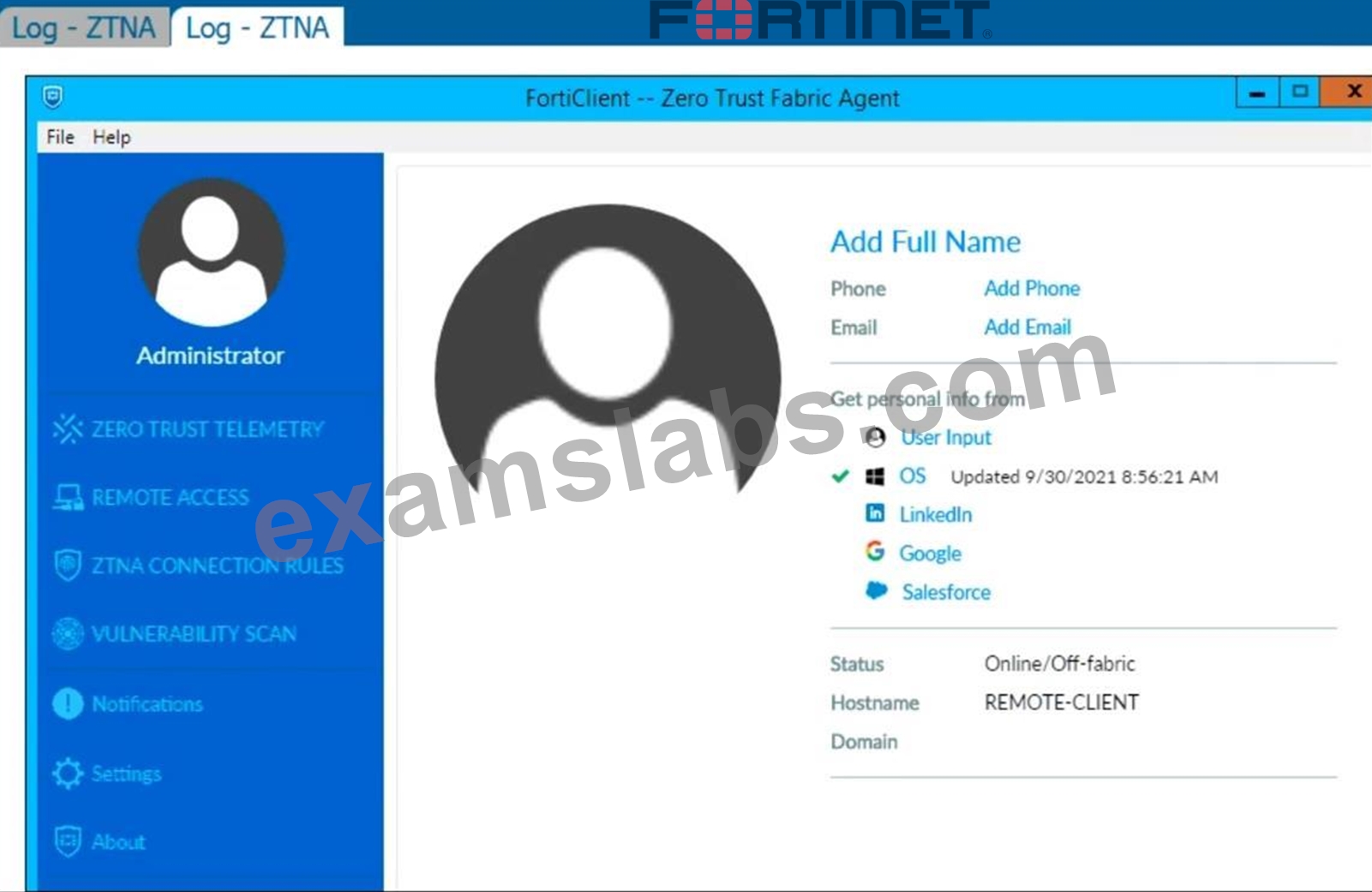
Refer to the exhibits. Which show the Zero Trust Tag Monitor and the FortiClient GUI status.
Remote-Client is tagged as Remote-Users on the FortiClient EMS Zero Trust Tag Monitor.
What must an administrator do to show the tag on the FortiClient GUI?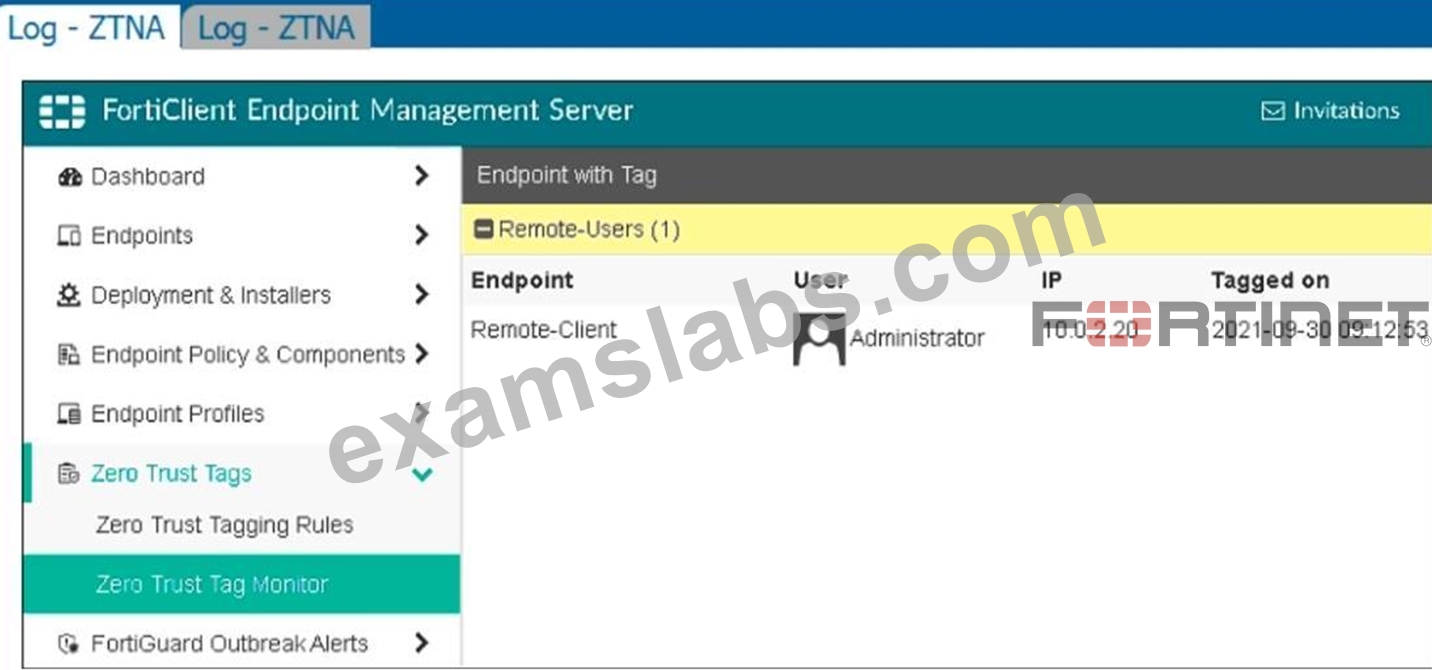
- A. Change the user identity settings to enable tag visibility
- B. Update tagging rule logic to enable tag visibility
- C. Change the endpoint control setting to enable tag visibility
- D. Change the FortiClient system settings to enable tag visibility
Answer: D
Explanation:
Based on the exhibits provided:
The "Remote-Client" is tagged as "Remote-Users" in the FortiClient EMS Zero Trust Tag Monitor.
To ensure that the tag "Remote-Users" is visible in the FortiClient GUI, the system settings within FortiClient need to be updated to enable tag visibility.
The tag visibility feature is controlled by FortiClient system settings which manage how tags are displayed in the GUI.
Therefore, the administrator needs to change the FortiClient system settings to enable tag visibility.
NEW QUESTION # 38
Which component or device shares ZTNA tag information through Security Fabric integration?
- A. FortiGate Access Proxy
- B. FortiGate
- C. FortiClient
Answer: B
Explanation:
FortiClient EMS is the component that shares ZTNA tag information through Security Fabric integration.
ZTNA tags are synchronized from FortiClient EMS as inputs for the FortiGate application gateway. They can be used in ZTNA policies as security posturechecks to ensure certain security criteria are met. FortiClient EMS can share ZTNA tags across multiple devices in the Fabric, such as FortiGate, FortiManager, and FortiAnalyzer. FortiClient EMS can also share ZTNA tags across multiple VDOMs on the same FortiGate device. FortiClient EMS can be configured to control the ZTNA tag sharing behavior in the Fabric Devices settings1.
FortiGate is the device that enforces ZTNA policies using ZTNA tags. FortiGate can receive ZTNA tags from FortiClient EMS via Fabric Connector. FortiGate can also publish ZTNA services through the ZTNA portal, which allows users to access applications without installing FortiClient. FortiGate can also provide ZTNA inline CASB for SaaS application access control2.
FortiGate Access Proxy is a feature that enables FortiGate to act as a proxy for ZTNA traffic. FortiGate Access Proxy can be deployed in front of the application servers to provide ZTNA protection. FortiGate Access Proxy can also be deployed behind the application servers to provide ZTNA visibility. FortiGate Access Proxy can use ZTNA tags to identify and authenticate users and devices2.
FortiClient is the endpoint software that connects to ZTNA services. FortiClient can register ZTNA tags with FortiClient EMS based on the endpoint security posture. FortiClient can also use ZTNA tags to access ZTNA services published by FortiGate. FortiClient can also use ZTNA tags to access SaaS applications with ZTNA inline CASB2.
References :=
* Technical Tip: Behavior of ZTNA Tags shared across multiple vdoms or multiple FortiGate firewalls in the Security Fabric connected to the same FortiClient EMS Server
* Synchronizing FortiClient ZTNA tags
* Zero Trust Network Access (ZTNA) to Control Application Access
NEW QUESTION # 39
Which component or device defines ZTNA lag information in the Security Fabric integration?
- A. FortiGate
- B. FortiGate Access Proxy
- C. FortiClient
- D. FortiClient EMS
Answer: D
Explanation:
Understanding ZTNA:
Zero Trust Network Access (ZTNA) requires defining tags for identifying and managing endpoint access.
Evaluating Components:
FortiClient EMS is responsible for managing and defining ZTNA tag information within the Security Fabric.
Conclusion:
The correct component that defines ZTNA tag information in the Security Fabric integration is FortiClient EMS.
NEW QUESTION # 40
Refer to the exhibit.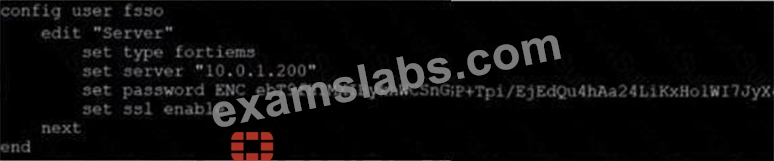
Based on the CLI output from FortiGate. which statement is true?
- A. FortiGate is configured with local user group
- B. FortiGate is configured to pull user groups from FortiAuthenticator
- C. FortiGate is configured to pull user groups from AD Server.
- D. FortiGate is configured to pull user groups from FortiClient EMS
Answer: D
Explanation:
Based on the CLI output from FortiGate:
* The configuration shows the use of "type fortiems," indicating that FortiGate is set up to interact with FortiClient EMS.
* The "server" field points to an IP address (10.0.1.200), which is typically the address of the FortiClient EMS server.
* The configuration includes an SSL-enabled connection, which is a common setup for secure communication between FortiGate and FortiClient EMS.
Thus, the configuration indicates that FortiGate is set up to pull user groups from FortiClient EMS.
References
* FortiGate Security 7.2 Study Guide, FSSO Configuration Section
* Fortinet Documentation on FortiGate and FortiClient EMS Integration
NEW QUESTION # 41
Which statement about the FortiClient EMS console logs is true?
- A. The FortiClient EMS administrator assigned the gateway list to All Groups.
- B. The FortiClient EMS administrator assigned the endpoint profile to All Groups.
- C. The FortiClient EMS administrator created an endpoint profile.
- D. The FortiClient EMS administrator deployed a new FortiClient installation to All Groups.
Answer: C
NEW QUESTION # 42
An administrator is required to maintain a software vulnerability on the endpoints, without showing the feature on the FortiClient. What must the administrator do to achieve this requirement?
- A. Disable select the vulnerability scan feature in the deployment package
- B. Click the hide icon on the vulnerability scan profile assigned to endpoint
- C. Use the default endpoint profile
- D. Select the vulnerability scan feature in the deployment package, but disable the feature on the endpoint profile
Answer: B
Explanation:
Requirement Analysis:
The administrator needs to maintain a software vulnerability scan on endpoints without showing the feature on FortiClient.
Evaluating Options:
Disabling the feature in the deployment package or endpoint profile would remove the functionality entirely, which is not desired.
Using the default endpoint profile may not meet the specific requirement of hiding the feature.
Clicking the hide icon on the vulnerability scan profile assigned to the endpoint will keep the feature active but hidden from the user's view.
Conclusion:
The correct action is to click the hide icon on the vulnerability scan profile assigned to the endpoint (C).
NEW QUESTION # 43
Refer to the exhibit.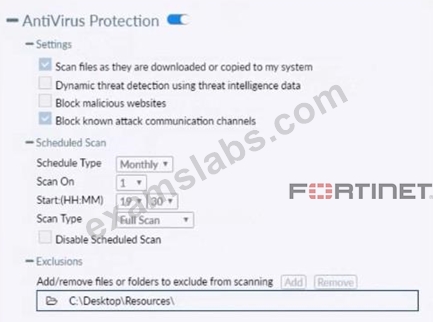
Based on the settings shown in the exhibit which statement about FortiClient behavior is true?
- A. FortiClient scans infected files when the user copies files to the Resources folder
- B. FortiClient blocks and deletes infected files after scanning them.
- C. FortiClient copies infected files to the Resources folder without scanning them.
- D. FortiClient quarantines infected files and reviews later, after scanning them.
Answer: D
Explanation:
Action On Virus Discovery Warn the User If a Process Attempts to Access Infected Files Quarantine Infected Files. You can use FortiClient to view, restore, or delete the quarantined file, as well as view the virus name, submit the file to FortiGuard, and view logs. Deny Access to Infected Files Ignore Infected Files
NEW QUESTION # 44
Which two VPNtypes can a FortiClientendpoint user inmate from the Windows command prompt? (Choose two)
- A. SSL VPN
- B. L2TP
- C. IPSec
- D. PPTP
Answer: A,C
Explanation:
FortiClient supports initiating the following VPN types from the Windows command prompt:
* IPSec VPN:FortiClient can establish IPSec VPN connections using command line instructions.
* SSL VPN:FortiClient also supports initiating SSL VPN connections from the Windows command prompt.
These two VPN types can be configured and initiated using specific command line parameters provided by FortiClient.
References
* FortiClient EMS 7.2 Study Guide, VPN Configuration Section
* Fortinet Documentation on Command Line Options for FortiClient VPN
NEW QUESTION # 45
Exhibit.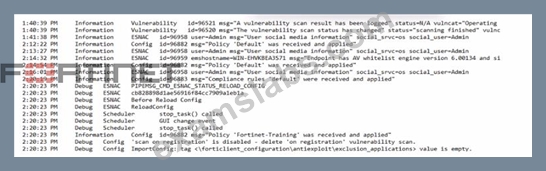
Based on the FortiClient logs shown in the exhibit, which endpoint profile policy is currently applied lo the ForliClient endpoint from the EMS server?
- A. Default
- B. Default configuration policy c
- C. Fortinet-Training
- D. Compliance rules default
Answer: C
Explanation:
Observation of Logs:
The logs show a policy named "Fortinet-Training" being applied to the endpoint.
Evaluating Policies:
The log entries indicate that the "Fortinet-Training" policy was received and applied.
Conclusion:
Based on the logs, the currently applied policy on the FortiClient endpoint is "Fortinet-Training".
Reference:
FortiClient EMS policy configuration and log analysis documentation from the study guides.
NEW QUESTION # 46
Refer to the exhibit, which shows the output of the ZTNA traffic log on FortiGate.
What can you conclude from the log message?
- A. The remote user connection does not match the local-in policy.
- B. The remote user connection does not match the ZTNA rule configuration.
- C. The remote user connection does not match the ZTNA server configuration.
- D. The remote user connection does not match the ZTNA firewall policy.
Answer: B
Explanation:
* Observation of ZTNA Traffic Log:
* The log message indicates that the remote user connection was denied due to failure to match a proxy policy.
* Evaluating Log Message:
* The message suggests that the connection does not match the existing ZTNA rule configuration, leading to the denial.
* Conclusion:
* The correct conclusion from the log message is that the remote user connection does not match the ZTNA rule configuration (B).
References:
* ZTNA traffic log analysis and configuration documentation from the study guides.
NEW QUESTION # 47
Refer to the exhibit.
Based on The settings shown in The exhibit, which statement about FortiClient behaviour is Hue?
- A. FortiClientscans infected files when the user copies files to the Resources folder.
- B. FortiClientcopies infected files to the Resources folder without scanning them.
- C. FortiClient quarantines infected ties and reviews later, after scanning them.
- D. FortiClientblocks and deletes infected files after scanning them.
Answer: A
Explanation:
Based on the settings shown in the exhibit, FortiClient is configured to scan files as they are downloaded or copied to the system. This means that if a user copies files to the "Resources" folder, which is not listed under exclusions, FortiClient will scan these files for infections. The exclusion path mentioned in the settings,
"C:\Users\Administrator\Desktop\Resources", indicates that any files copied to this specific folder will not be scanned, but since the question implies that the "Resources" folder is not the same as the excluded path, FortiClient will indeed scan the files for infections.
NEW QUESTION # 48
Exhibit.
Refer to the exhibits, which show the Zero Trust Tag Monitor and the FortiClient GUI status.
Remote-Client is tagged as Remote-User* on the FortiClient EMS Zero Trust Tag Monitor.
What must an administrator do to show the tag on the FortiClient GUI?
- A. Change the FortiClient system settings to enable lag visibility.
- B. Update tagging rule logic to enable tag visibility.
- C. Change the endpoint alerts configuration to enable tag visibility.
- D. Change the FortiClient EMS shared settings to enable tag visibility.
Answer: C
Explanation:
* Observation of Exhibits:
* The exhibits show the Zero Trust Tag Monitor on FortiClient EMS and the FortiClient GUI status.
* Remote-Client is tagged as "Remote-Endpoints" on the FortiClient EMS Zero Trust Tag Monitor.
* Enabling Tag Visibility:
* To show the tag on the FortiClient GUI, the endpoint alerts configuration must be adjusted to enable tag visibility.
* Verification:
* The correct action is to change the endpoint alerts configuration to enable tag visibility, ensuring that the tag appears in the FortiClient GUI.
References:
* FortiClient EMS and FortiClient configuration documentation from the study guides.
NEW QUESTION # 49
Which two statements about ZTNA destinations are true? (Choose two.)
- A. FortiCIient ZTNA destination authentication is enabled by default.
- B. FortiClient ZTNA destinations do not support a wildcard FQDN.
- C. FottiClient ZTNA destinations use an existing VPN tunnel to create a secure connection.
- D. FortiClient ZTNA destinations provides access through TCP forwarding.
- E. FortiClient ZTNA destination encryption is disabled by default.
Answer: B,E
NEW QUESTION # 50
Which two statements are true about the ZTNA rule? (Choose two.)
- A. It enforces access control.
- B. It applies SNAT to protect traffic.
- C. It applies security profiles to protect traffic
- D. It defines the access proxy.
Answer: A,C
Explanation:
Understanding ZTNA Rule Configuration:
The ZTNA rule configuration shown in the exhibit defines how traffic is managed and controlled based on specific tags and conditions.
Evaluating Rule Components:
The rule includes security profiles to protect traffic by applying various security checks (A).
The rule also enforces access control by determining which endpoints can access the specified resources based on the ZTNA tag (D).
Eliminating Incorrect Options:
SNAT (Source Network Address Translation) is not mentioned as part of this ZTNA rule.
The rule does not define the access proxy but uses it to enforce access control.
Conclusion:
The correct statements about the ZTNA rule are that it applies security profiles to protect traffic (A) and enforces access control (D).
Reference:
ZTNA rule configuration documentation from the study guides.
NEW QUESTION # 51
Which of the following overrides site categories action in FortiClient web-filter?
- A. URL list
- B. Block malicious website on AV
- C. Web exclusion list
- D. FortiSandbox custom URL categories
Answer: C
NEW QUESTION # 52
Which security fabric component sends a notification io quarantine an endpoint after IOC detection "n the automation process?
- A. FortiGate
- B. FortiAnalyzer
- C. FortiClient
- D. FortiClient EMS
Answer: D
Explanation:
* Understanding the Automation Process:
* In the Security Fabric, automation processes can include actions such as quarantining an endpoint
* after an IOC (Indicator of Compromise) detection.
* Evaluating Responsibilities:
* FortiClient EMS plays a crucial role in endpoint management and can send notifications to quarantine endpoints.
* Conclusion:
* The correct security fabric component that sends a notification to quarantine an endpoint after IOC detection is FortiClient EMS.
References:
* FortiClient EMS and automation process documentation from the study guides.
NEW QUESTION # 53
Exhibit.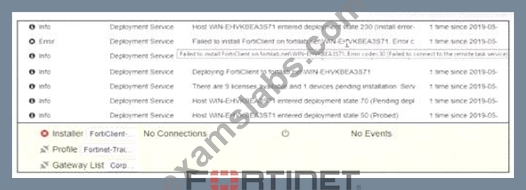
Based on the logs shown in the exhibit, why did FortiClient EMS tail to install FortiClient on the endpoint?
- A. The remote registry service is not running.
- B. The FortiClient antivirus service is not running.
- C. The task scheduler service is not running.
- D. The Windows installer service is not running.
Answer: C
Explanation:
https://community.fortinet.com/t5/FortiClient/Technical-Note-FortiClient-fails-to-install-from-FortiClient- EMS/ta-p/193680 The deployment service error message may be caused by any of the following. Try eliminating them all, one at a time.
1. Wrong username or password in the EMS profile
2. Endpoint is unreachable over the network
3. Task Scheduler service is not running
4. Remote Registry service is not running
5. Windows firewall is blocking connection
NEW QUESTION # 54
......
FCP_FCT_AD-7.2 PDF Dumps Are Helpful To produce Your Dreams Correct QA's: https://www.examslabs.com/Fortinet/Fortinet-Certified-Professional-Network-Security/best-FCP_FCT_AD-7.2-exam-dumps.html
FCP_FCT_AD-7.2 Practice Test Dumps with 100% Passing Guarantee: https://drive.google.com/open?id=1Y8Fla3B0omxOlM4wYsy3oxrBXSnEwiKc