

Prepare NSE7_PBC-7.2 Question Answers Free Update With 100% Exam Passing Guarantee [2025]
Dumps Real Fortinet NSE7_PBC-7.2 Exam Questions [Updated 2025]
Fortinet NSE7_PBC-7.2 certification is a valuable credential for professionals who work in cloud security. Fortinet NSE 7 - Public Cloud Security 7.2 certification demonstrates your expertise in securing public cloud environments and validates your skills in using Fortinet products and solutions. With this certification, you can enhance your career prospects and increase your earning potential.
NEW QUESTION # 40
Which statement about Transit Gateway (TGW) in Amazon Web Services (AWS) is true?
- A. TGW can have multiple TGW route tables.
- B. Both the TGW attachment and propagation must be in the same TGW route table
- C. A TGW attachment can be associated with multiple TGW route tables.
- D. The TGW default route table cannot be disabled.
Answer: A
Explanation:
A transit gateway is a network transit hub that connects VPCs and on-premises networks. A transit gateway route table is a set of rules that determines how traffic is routed among the attachments to the transit gateway. A transit gateway can have multiple route tables, and you can associate different attachments with different route tables. This allows you to control how traffic is routed between your VPCs and VPNs based on your network design and security requirements.
NEW QUESTION # 41
Refer to the exhibit. Consider an active-passive HA deployment in Microsoft Azure. The exhibit shows an excerpt from the passive FortiGate-VM node.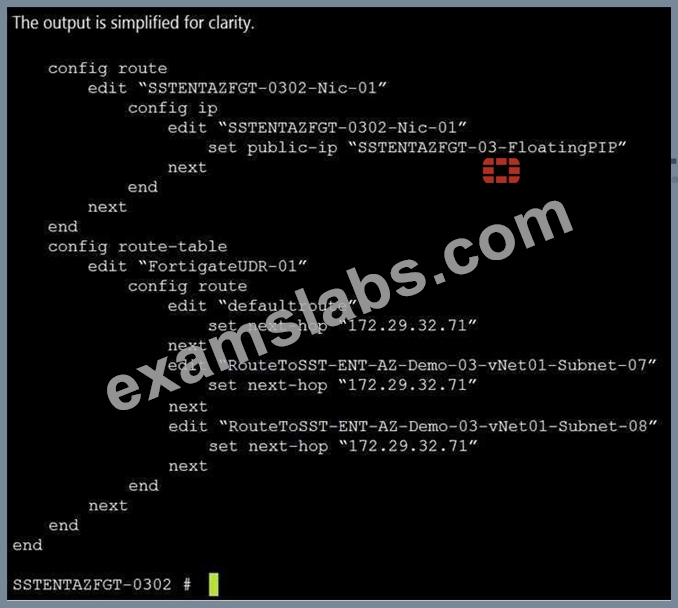
If the active FortiGate-VM fails, what are the results of the API calls made by the FortiGate named SSTENTAZFGT-0302? (Choose two.)
- A. The network interface of the active unit moves to itself
- B. SSTENTAZFGT-03-FloatingPIP is assigned to the IP configuration with the name SSTENTAZFGT- 0302-Nic-01, under the network interface SSTENTAZFGT-0302-Nic-01
- C. SSTENTAZFGT-03-FloatingPIP public IP is assigned to NIC SSTENTAZFGT-0302-Nic-01
- D. 172.29.32.71 is set as a next hop IP for all routes under FortigateUDR-01
Answer: B,D
NEW QUESTION # 42
What are three important steps required to get Terraform ready using Microsoft Azure Cloud Shell? (Choose three.)
- A. Subscribe to Terraform in Azure.
- B. Set up a storage account in Azure.
- C. use the -O command to download Terraform.
- D. Use the wget (te=aform vession) command to upload Terraform.
- E. Move the Terraform file to the bin directory.
Answer: B,D,E
Explanation:
To get Terraform ready using Microsoft Azure Cloud Shell, you need to perform the following steps:
Set up a storage account in Azure. This is required to store the Terraform state file in a blob container, which enables collaboration and persistence of the infrastructure configuration.
Use the wget (terraform_version) command to upload Terraform. This command downloads the latest version of Terraform from the official website and saves it as a zip file in the current directory.
Move the Terraform file to the bin directory. This step extracts the Terraform executable from the zip file and moves it to the bin directory, which is part of the PATH environment variable. This allows you to run Terraform commands from any directory in Cloud Shell.
NEW QUESTION # 43
Refer to the exhibit. The exhibit shows an active-passive high availability FortiGate pair with external and internal Azure load balancers. There is no SDN connector used in this solution Which configuration should the administrator implement?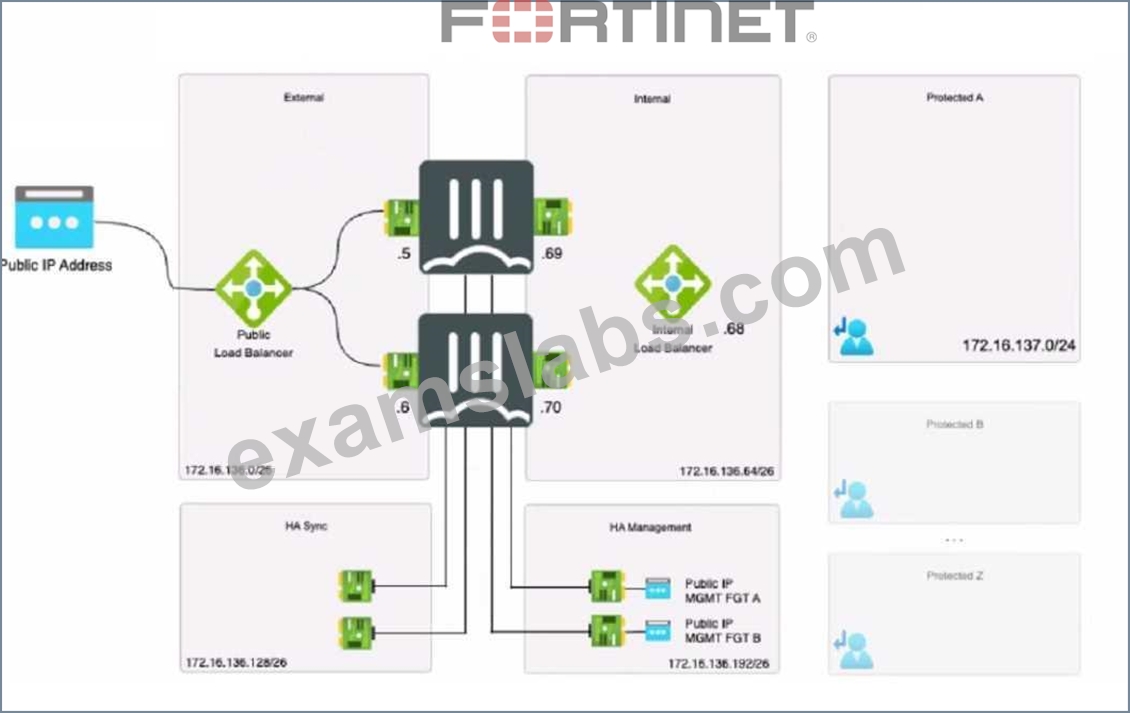
- A. Probe IP address with two static routes
- B. Lambda IP address with one static route.
- C. Public load balancer IP address with two BGP routes.
- D. Probe IP address with one BGP route
Answer: A
Explanation:
Based on the provided exhibit showing an active-passive FortiGate High Availability (HA) pair with external and internal Azure load balancers and without the use of an SDN connector, the administrator should implement a Probe IP address with two static routes (Option B). Probe IP Address: Azure load balancers use a health probe to determine the health of the instances in the backend pool. The health probe ensures that the load balancer only directs traffic to the active (primary) FortiGate in an HA pair.
Two Static Routes: Given that this is an active-passive setup, static routing should be used to ensure deterministic traffic flow. Two static routes would be configured to ensure that traffic can flow to the active unit and be correctly routed to the protected subnets in failover scenarios.
NEW QUESTION # 44
Which statement about Transit Gateway (TGW) in Amazon Web Services (AWS) is true?
- A. TGW can have multiple TGW route tables.
- B. Both the TGW attachment and propagation must be in the same TGW route table
- C. A TGW attachment can be associated with multiple TGW route tables.
- D. The TGW default route table cannot be disabled.
Answer: A
Explanation:
According to the AWS documentation for Transit Gateway, a transit gateway is a network transit hub that connects VPCs and on-premises networks. A transit gateway route table is a set of rules that determines how traffic is routed among the attachments to the transit gateway1.
A transit gateway can have multiple route tables, and you can associate different attachments with different route tables. This allows you to control how traffic is routed between your VPCs and VPNs based on your network design and security requirements1.
The other options are incorrect because:
* Both the TGW attachment and propagation must be in the same TGW route table is not true. You can associate an attachment with one route table and enable propagation from another attachment to a different route table. This allows you to separate the routing domains for your attachments1.
* A TGW attachment can be associated with multiple TGW route tables is not true. You can only associate an attachment with one route table at a time. However, you can change the association at any time1.
* The TGW default route table cannot be disabled is not true. You can disable the default route table by deleting all associations and propagations from it. However, you cannot delete the default route table itself1.
1: Transit Gateways - Amazon Virtual Private Cloud
NEW QUESTION # 45
Refer to the exhibit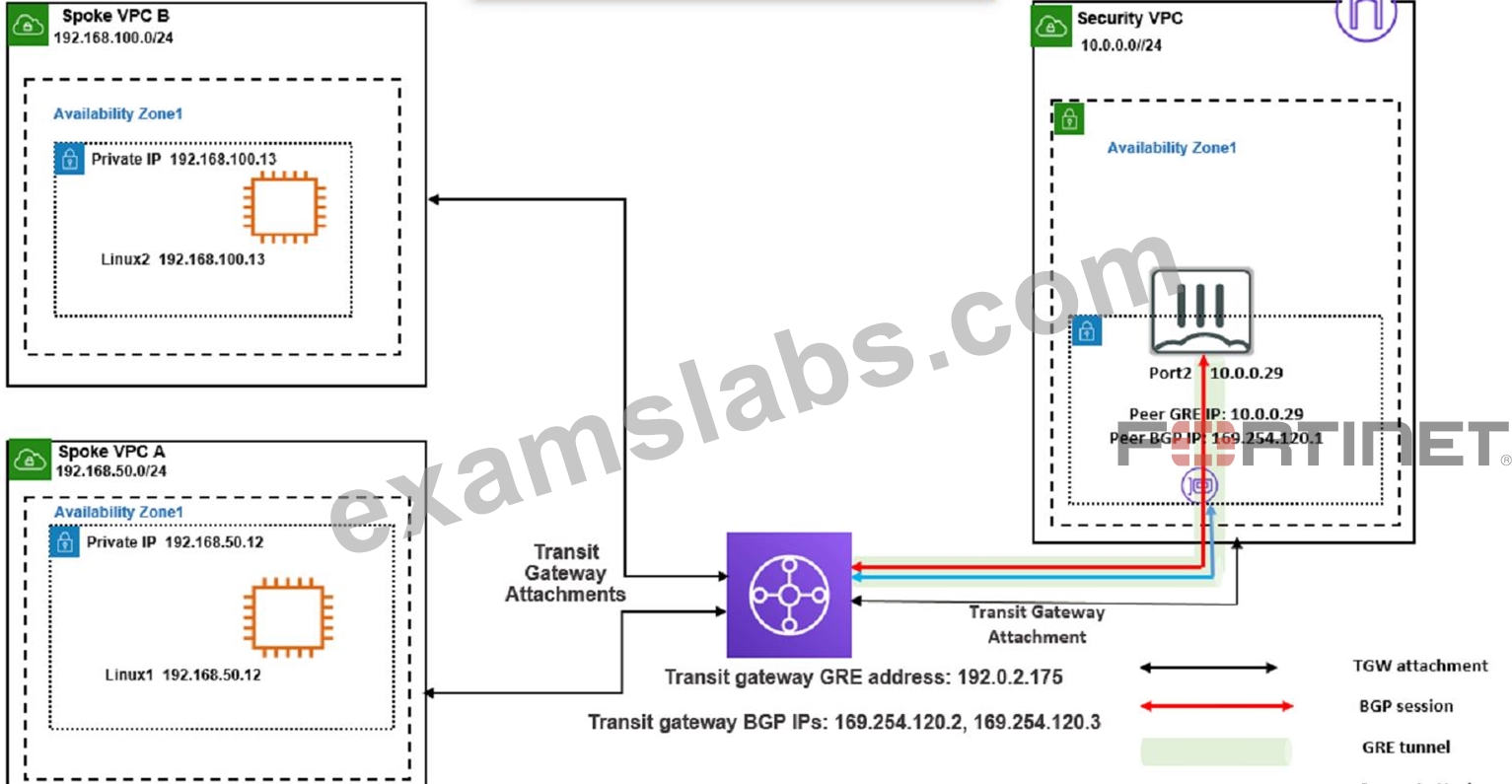
You attempted to access the Linux1 EC2 instance directly from the internet using its public IP address in AWS.
However, your connection is not successful.
Given the network topology, what can be the issue?
- A. The Transit Gateway BGP IP address is incorrect.
- B. There is no elastic IP address attached to FortiGate in the Security VPC.
- C. There is no connection between VPC A and VPC B.
- D. There is no internet gateway attached to the Spoke VPC A.
Answer: D
Explanation:
This is because the Linux1 EC2 instance is not accessible directly from the internet using its public IP address in AWS.
An internet gateway is a horizontally scaled, redundant, and highly available VPC component that allows communication between instances in your VPC and the internet. Without an internet gateway, the Linux1 EC2 instance cannot receive or send traffic to or from the internet, even if it has a public IP address assigned to it.
To fix this issue, you need to attach an internet gateway to the Spoke VPC A and configure a route table that directs internet-bound traffic to the internet gateway. You also need to ensure that the Linux1 EC2 instance has a security group that allows inbound and outbound traffic on the desired ports.
: [Internet Gateways - Amazon Virtual Private Cloud] : [Attach an Internet Gateway to Your VPC - Amazon Virtual Private Cloud] : [Security Groups for Your VPC - Amazon Virtual Private Cloud]
NEW QUESTION # 46
Refer to the exhibit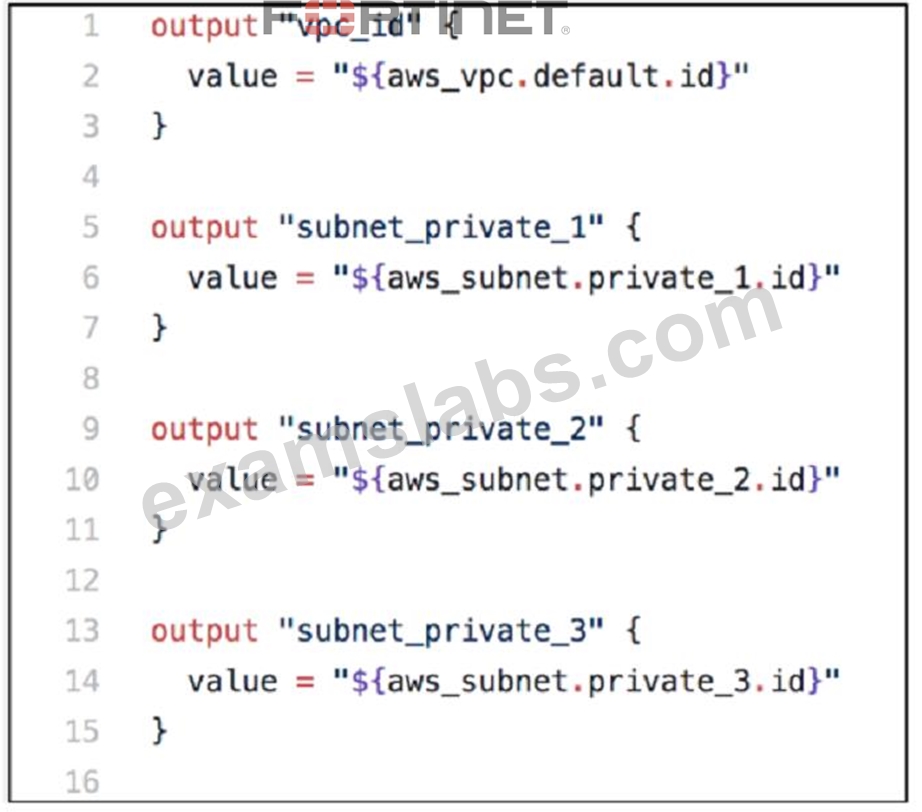
You are tasked with deploying a webserver and FortiGate VMS in AWS_ You are using Terraform to automate the process Which two important details should you know about the Terraform files? (Choose two.)
- A. All the output values are available after a successful terraform apply command
- B. The subnet_private 1 value is defined in the variables . tf file
- C. You must specify all the AWS credentials in the output. of file.
- D. After the deployment, Terraform output values are visible only through AWS CloudShell.
Answer: A,B
Explanation:
A . All the output values are available after a successful terraform apply command. This means that after the deployment, you can view the output values by running terraform output or terraform show in the same directory where you ran terraform apply1. You can also use the output values in other Terraform configurations or external systems by using the terraform output command with various options2. B. The subnet_private_1 value is defined in the variables.tf file. This means that the subnet_private_1 value is an input variable that can be customized by passing a different value when running terraform apply or by setting an environment variable3. The variables.tf file is where you declare all the input variables for your Terraform configuration4.
The other options are incorrect because:
After the deployment, Terraform output values are not visible only through AWS CloudShell. You can access them from any shell or terminal where you have Terraform installed and configured with your AWS credentials.
You do not need to specify all the AWS credentials in the output.tf file. The output.tf file is where you declare all the output values for your Terraform configuration4. You can specify your AWS credentials in a separate file, such as provider.tf, or use environment variables or shared credentials files. Reference:
Output Values - Configuration Language | Terraform - HashiCorp Developer Command: output - Terraform by HashiCorp Input Variables - Configuration Language | Terraform - HashiCorp Developer Configuration Language | Terraform - HashiCorp Developer
NEW QUESTION # 47
In an SD-WAN TGW Connect topology, which three initial steps are mandatory when routing traffic from a spoke VPC to a security VPC through a Transit Gateway? (Choose three.)
- A. From the spoke VPC internal routing table, point 0.0.0.0/0 traffic to the TGW
- B. From the security VPC TGW subnet routing table: point 0.0.0.0/0 traffic to the TGW
- C. From the security VPC FortiGate internal subnet routing table, point 0.0.0.0/0 traffic to the TGW
- D. From the security VPC TGW subnet routing table: point 0.0.0.0/0 traffic to theFortiGate internal port
- E. From both spoke VPCs and the security VPC, point 0.0.0.0/0 traffic to the Internet Gateway
Answer: A,C,D
Explanation:
* Spoke VPC Routing: The 0.0.0.0/0 (default) route in the spoke VPC must point to the Transit Gateway attachment for traffic to reach other VPCs or external destinations.
* Security VPC Routing: Traffic from the security VPC needs to pass through the FortiGate for inspection and security controls. Therefore, the 0.0.0.0/0 route in the security VPC's TGW subnet routing table must point to the FortiGate's internal port.
* FortiGate Routing: The FortiGate's internal subnet must have its 0.0.0.0/0 route configured to point to the Transit Gateway attachment, allowing traffic to be returned to other VPCs or reach the internet.
In an SD-WAN TGW Connect topology, when routing traffic from a spoke VPC to a security VPC through a Transit Gateway, the mandatory initial steps include:
* From the spoke VPC internal routing table, point 0.0.0.0/0 traffic to the TGW (Option A):This step is crucial for ensuring that all traffic from the spoke VPC destined for external networks is directed through the Transit Gateway, allowing for centralized management and security inspection.
* From the security VPC TGW subnet routing table: point 0.0.0.0/0 traffic to the FortiGate internal port (Option B):Routing all traffic from the TGW subnet in the security VPC to the FortiGate's internal port ensures that traffic is subjected to the necessary security policies and inspections provided by the FortiGate appliance before it proceeds to other destinations or returns to the spoke VPCs.
* From the security VPC FortiGate internal subnet routing table, point 0.0.0.0/0 traffic to the TGW (Option D):This configuration ensures that traffic returning from the security processes handled by the FortiGate is routed back through the Transit Gateway, maintaining the integrity of the secure transit path and ensuring proper routing back to the originating spoke or onward to the internet.
References:These steps align with best practices for implementing SD-WAN solutions in a cloud environment, ensuring that all traffic is appropriately routed through security appliances for necessary controls and monitoring, asdetailed in the Fortinet SD-WAN documentation and AWS Transit Gateway connectivity guidelines.
NEW QUESTION # 48
You have previously deployed an Amazon Web Services (AWS) transit virtual private cloud (VPC) with a pair of FortiGate firewalls (VM04 / c4.xlarge) as your security perimeter. You are beginning to see high CPU usage on the FortiGate instances.
Which action will fix this issue?
- A. Convert the transit VPC firewalls into an auto-scaling group and launch additional EC2 instances in that group.
- B. Convert the c4.xlarge instances to m4.xlarge instances.
- C. Migrate the transit VPNs to new and larger instances (VM08 / c4.2xlarge).
- D. Convert from IPsec tunnels to generic routing encapsulation (GRE) tunnels, for the VPC peering connections.
Answer: A
Explanation:
Multiple FortiGate-VM instances form an Auto Scaling group to provide highly efficient clustering at times of high workloads. FortiGate-VM instances can be scaled out automatically according to predefined workload levels.
NEW QUESTION # 49
What is the main advantage of using SD-WAN Transit Gateway Connect over traditional SD-WAN?
- A. You can use GRE-based tunnel attachments
- B. You can combine it with IPsec to achieve higher bandwidth
- C. You can use BGP over IPsec for maximum throughput
- D. It eliminates the use of ECMP
Answer: A
Explanation:
* Simplified and Scalable Connectivity: Transit Gateway Connect allows you to establish GRE tunnels to your SD-WAN appliances natively within the AWS network. This eliminates the complexity of managing individual IPsec VPN connections, especially as your cloud presence grows.
* Potential for Enhanced Performance: GRE offers lower overhead compared to IPsec, which can result in higher throughput for bandwidth-intensive SD-WAN applications.
* Flexibility: While IPsec is supported for scenarios requiring strong encryption, the focus on GRE highlights the performance and scalability benefits that are often prioritized when integrating SD-WAN with AWS.
* Dynamic Routing: The integration with BGP further streamlines network management by automating route updates and distribution.
Addressing the IPsec Consideration:
It's important to acknowledge that SD-WAN Transit Gateway Connect does support IPsec. If your question is specifically framed within the context of Fortinet's FCSS 7.2 materials and they emphasize the hybrid usage of GRE and IPsec, then a modified answer might be appropriate:
NEW QUESTION # 50
How does Terraform keep track of provisioned resources?
- A. Terraform does not keep the state of resources created
- B. It uses the terraform. tfvars file.
- C. It uses the terraform. tf state file
- D. It uses the database. tf file.
Answer: C
Explanation:
Terraform manages and tracks the state of infrastructure resources through a file known as terraform.tfstate. This file is automatically created by Terraform and is updated after the application of a Terraform plan to capture the current state of the resources.
State File Purpose: The terraform.tfstate file contains a JSON object that records the IDs and properties of resources Terraform manages, so that it can map real-world resources to your configuration, keep track of metadata, and improve performance for large infrastructures.
State File Management: This file is crucial for Terraform to perform resource updates, deletions, and for creating dependencies. It's essentially the 'source of truth' for Terraform about your managed infrastructure and services.
NEW QUESTION # 51
How does an administrator secure container environments from newly emerged security threats?
- A. Use Amazon AWS-related application control signatures
- B. Use Amazon AWS_S3-related application control signatures
- C. Use Docker-related application control signatures
- D. Use distributed network-related application control signatures.
Answer: C
Explanation:
Securing container environments from newly emerged security threats involves employing specific security mechanisms tailored to the technology and structure of containers. In this context, the use of Docker-related application control signatures (Option D) is critical for effectively managing and mitigating threats in containerized environments.
Docker-Specific Threats: Docker containers, being a prevalent form of container technology, are targeted by various security threats, including those that exploit vulnerabilities specific to the Docker environment and runtime. Using Docker-related application control signatures means implementing security measures that are specifically designed to detect and respond to anomalies and threats that are unique to Docker containers.
Application Control Signatures: These are sets of definitions that help identify and block potentially malicious activities within application traffic. By focusing on Docker-related signatures, administrators can ensure that the security tools are finely tuned to the operational specifics of Docker containers, thereby providing a robust defense against exploits that target container- specific vulnerabilities.
NEW QUESTION # 52
Which two statements are true about Transit Gateway Connect peers in anlPv4 BGP configuration'? (Choose two.)
- A. The inside CIDR blocks are used for BGP peering
- B. You cannot use IPv6 addresses
- C. You must configure the second address from the IPv4 range on the device as the BGP IP address
- D. You must specify a /29CIDR block from the 169.254.0.0/16 range
Answer: A,D
Explanation:
For Transit Gateway Connect peers in an IPv4 BGP configuration, the correct statements are:
* The inside CIDR blocks are used for BGP peering (Option A):In a BGP configuration for Transit Gateway Connect, the inside CIDR blocks, typically within the 169.254.0.0/16 range, are designated for the BGP peering connections. These blocks are reserved for internal network protocols and are commonly used in AWS for automatic IP address assignment within managed networking services.
* You must specify a /29 CIDR block from the 169.254.0.0/16 range (Option C):It is a requirement to specify a /29 CIDR block within the 169.254.0.0/16 range for setting up the network interfaces that facilitate BGP peering. This specific range allows for the necessary number of IP addresses to establish BGP sessions effectively between the transit gateway and on-premises or other virtual appliances.
References:These practices are in line with AWS guidelines for Transit Gateway Connect, which stipulate the use of specified CIDR blocks for internal networking and BGP configurations, ensuring seamless connectivity and routing management.
NEW QUESTION # 53
Refer to the exhibit
The exhibit shows the results of a FortiCNP registry scan
Which two statements are correct? (Choose two )
- A. The registry scan is part of the FortiCNP container protection.
- B. When adding a repository, you can add a minimum number of images to be imported through the CAP section.
- C. The registry scan is part of the FortiCNP cloud protection.
- D. When adding a repository, you can leave the Tag section blank to scan all images-
Answer: A,D
Explanation:
Explanation
The exhibit shows the results of a FortiCNP registry scan, which is part of the FortiCNP container protection. FortiCNP's Container Protection provides deep visibility into the security posture of container registries and images1. The registry scan utilizes Common Vulnerabilities and Exposures (CVE) index regularly updated by NVD to detect underlying vulnerabilities, security flaws, and provides security best practices2. The registry scan is performed at the registry level, and it can scan all images in a repository if the Tag section is left blank when adding a repository2. The CAP section stands for Container Assurance Policy, which defines the minimum number of images to be scanned per repository3. Therefore, the correct statements are A and C. References: Container Image Scan | FortiCNP 22.3.a, FortiCNP, Cloud Native Application Protection Platform | FortiCNP
NEW QUESTION # 54
A Network security administrator is searching for a solution to secure traffic going in and out of the container infrastructure.
In which two ways can Fortinet container security help secure container infrastructure? (Choose two.)
- A. FortiGate NGFW and FortiSandbox can be used to secure container traffic
- B. FortiGate NGFW can be placed between each application container for north-south traffic inspection
- C. FortiGate NGFW can inspect north-south container traffic with label aware policies
- D. FortiGate NGFW can connect to the worker node and protects the container-
Answer: A,C
Explanation:
FortiGate NGFW can inspect north-south container traffic with label aware policies and FortiGate NGFW and FortiSandbox can be used to secure container traffic.
According to the Fortinet documentation for container security, FortiGate NGFW can provide the following benefits for securing container infrastructure:
- It can inspect north-south traffic between containers and external networks using label aware policies, which allow for dynamic policy enforcement based on Kubernetes labels and metadata.
- It can integrate with FortiSandbox to provide advanced threat protection for container traffic, by sending suspicious files or URLs to a cloud-based sandbox for analysis and detection.
- It can leverage FortiGuard Security Services to provide real-time threat intelligence and updates for container traffic, such as antivirus, web filtering, IPS, and application control.
NEW QUESTION # 55
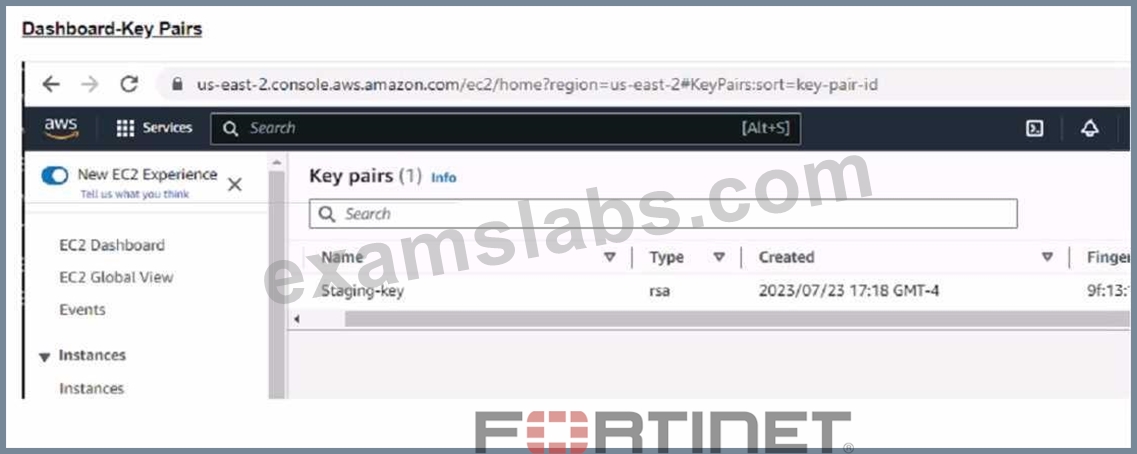
Refer to the exhibit. What value or values must the administrator use in the SSH Key section to deploy a FortiGate VM using Terraform in Amazon Web Services (AWS)?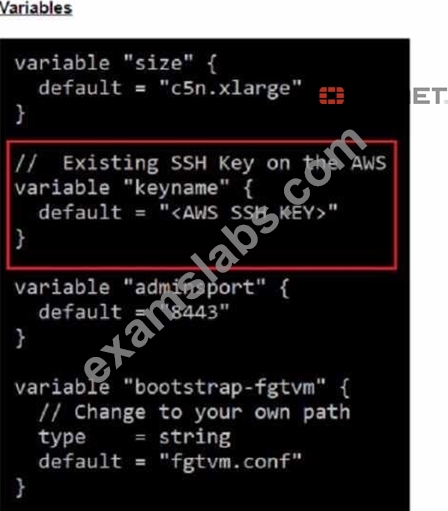
- A. Use the Name and ID values of the key pair
- B. Use the ID value of the key pair.
- C. Use the Name of the key pair
- D. Use the Fingerprint value of the key pair
Answer: C
Explanation:
For deploying a FortiGate VM using Terraform in AWS, the administrator must use: B. Use the Name of the key pair.
Terraform and AWS SSH Keys: When deploying instances in AWS using Terraform, it is required to specify the name of the SSH key pair to enable key-based authentication to the instance post- deployment.
Configuration Syntax: The variable keyname within the Terraform configuration should match the exact name of the SSH key pair as it is stored in AWS. This ensures that Terraform can reference the correct key during the deployment process to set up SSH access to the FortiGate VM.
Terraform Variables: The variable "keyname" block in the Terraform configuration will look for the key pair name as it should be declared in the terraform.tfvars file or passed as a variable during execution. This does not require the key pair's ID or fingerprint, just its name.
NEW QUESTION # 56
In an SD-WAN TGW Connect topology, which three initial steps are mandatory when routing traffic from a spoke VPC to a security VPC through a Transit Gateway? (Choose three.)
- A. From the spoke VPC internal routing table, point 0.0.0.0/0 traffic to the TGW
- B. From the security VPC TGW subnet routing table: point 0.0.0.0/0 traffic to the TGW
- C. From the security VPC FortiGate internal subnet routing table, point 0.0.0.0/0 traffic to the TGW
- D. From the security VPC TGW subnet routing table: point 0.0.0.0/0 traffic to the FortiGate internal port
- E. From both spoke VPCs and the security VPC, point 0.0.0.0/0 traffic to the Internet Gateway
Answer: A,C,D
Explanation:
Spoke VPC Routing: The 0.0.0.0/0 (default) route in the spoke VPC must point to the Transit Gateway attachment for traffic to reach other VPCs or external destinations. Security VPC Routing: Traffic from the security VPC needs to pass through the FortiGate for inspection and security controls. Therefore, the 0.0.0.0/0 route in the security VPC's TGW subnet routing table must point to the FortiGate's internal port. FortiGate Routing: The FortiGate's internal subnet must have its 0.0.0.0/0 route configured to point to the Transit Gateway attachment, allowing traffic to be returned to other VPCs or reach the internet.
In an SD-WAN TGW Connect topology, when routing traffic from a spoke VPC to a security VPC through a Transit Gateway, the mandatory initial steps include:
From the spoke VPC internal routing table, point 0.0.0.0/0 traffic to the TGW (Option A): This step is crucial for ensuring that all traffic from the spoke VPC destined for external networks is directed through the Transit Gateway, allowing for centralized management and security inspection.
From the security VPC TGW subnet routing table: point 0.0.0.0/0 traffic to the FortiGate internal port (Option B): Routing all traffic from the TGW subnet in the security VPC to the FortiGate's internal port ensures that traffic is subjected to the necessary security policies and inspections provided by the FortiGate appliance before it proceeds to other destinations or returns to the spoke VPCs.
From the security VPC FortiGate internal subnet routing table, point 0.0.0.0/0 traffic to the TGW (Option D): This configuration ensures that traffic returning from the security processes handled by the FortiGate is routed back through the Transit Gateway, maintaining the integrity of the secure transit path and ensuring proper routing back to the originating spoke or onward to the internet.
NEW QUESTION # 57
In an SD-WAN TGW Connect topology, which three initial steps are mandatory when routing traffic from a spoke VPC to a security VPC through a Transit Gateway? (Choose three.)
- A. From the security VPC TGW subnet routing table, point 0.0.0.0/0 traffic to the TGW.
- B. From both spoke VPCs, and the security VPC, point 0.0.0.0/0 traffic to the Internet Gateway.
- C. From the security VPC TGW subnet routing table, point 0.0.0.0/0 traffic to the FortiGate internal port.
- D. From the spoke VPC internal routing table, point 0.0.0.0/0 traffic to the TGW.
- E. From the security VPC FortiGate internal subnet routing table, point 0.0.0.0/0 traffic to the TGW.
Answer: C,D,E
NEW QUESTION # 58
Refer to the exhibit.
An administrator has deployed a FortiGate VM in Amazon Web Services (AWS) and is trying to access it using its public IP address from their local computer However, the connection is not successful and at the same time FortiGate is not receiving any HTTPS or SSH traffic to its external interface What should the administrator check for possible issue?
- A. Run a debug flow to check any network ACLs
- B. Check the FortiGate instance ID
- C. Check the inbound network security group rules
- D. Check the FortiGate firewall policies
Answer: C
Explanation:
Considering the situation where the administrator is unable to access the FortiGate VM using its public IP address and no traffic is reaching the FortiGate's external interface, the administrator should check:
D:Check the inbound network security group rules.
* Network Security Group Rules:AWS uses security groups as a virtual firewall that controls inbound and outbound traffic to AWS resources such as EC2 instances. If the FortiGate VM's public interface is not receiving HTTPS or SSH traffic, it's likely because the inbound security group rules associated with that interface are not allowing access on the necessary ports (HTTPS - port 443, SSH - port 22).
* Troubleshooting:The administrator should verify that the security group rules for the FortiGate VM's network interface allow inbound traffic on the specific ports used for management access. If these rules are absent or misconfigured, the intended traffic will be blocked, resulting in the inability to connect.
References:The role of security groups in network traffic management is a core concept in AWS and is outlined in AWS documentation. Checking security group rules is a standard troubleshooting step when dealing with connectivity issues to AWS resources.
NEW QUESTION # 59
......
Fortinet NSE7_PBC-7.2 exam is a certification exam designed for IT professionals who specialize in public cloud security. NSE7_PBC-7.2 exam is designed to test the candidate's knowledge and skills in securing public cloud environments using Fortinet's security solutions. NSE7_PBC-7.2 exam covers a wide range of topics, including cloud security architecture, security management, data protection, and compliance.
The NSE7_PBC-7.2 exam is a certification exam that requires the candidate to answer 60 multiple-choice questions within 120 minutes. NSE7_PBC-7.2 exam is available in English, Japanese, and Simplified Chinese, and the passing score is 70%.
NSE7_PBC-7.2 Exam Dumps, NSE7_PBC-7.2 Practice Test Questions: https://www.examslabs.com/Fortinet/NSE-7-Network-Security-Architect/best-NSE7_PBC-7.2-exam-dumps.html
Free NSE7_PBC-7.2 Exam Dumps to Pass Exam Easily: https://drive.google.com/open?id=1iH5DsdpPp-pzP8Oyn_WkSMjRJO5nvbwf