

Pass F5 F5CAB3 exam Dumps 100 Pass Guarantee With Latest Demo
The F5CAB3 PDF Dumps Greatest for the F5 Exam Study Guide!
NEW QUESTION # 41
What is the status of a pool member when manual resume is enabled and a health check first fails and then passes?
- A. Offline (Enabled)
- B. Available (Disabled)
- C. Available (Enabled)
- D. Offline (Disabled)
Answer: D
Explanation:
With manual resume enabled, BIG-IP does not automatically return a pool member to service after recovery. The member remains offline until manually re-enabled.
NEW QUESTION # 42
Exhibit: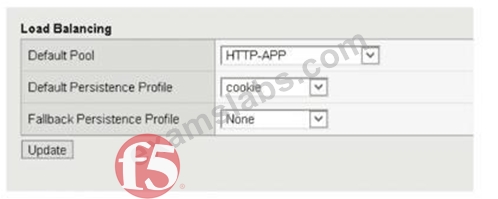
Due to a change in application requirements, a BIG-IP Administrator needs to modify the configuration of a Virtual Server to include a Fallback Persistence Profile. Which persistence profile type should the BIG-IP Administrator use for this purpose?
- A. Source Address Affinity
- B. Universal
- C. Hash
- D. SSL
Answer: A
Explanation:
In a BIG-IP environment, a Fallback Persistence Profile is utilized as a secondary "stickiness" mechanism when the primary (Default) persistence method fails to provide a valid persistence record. For example, if a Virtual Server uses HTTP Cookie Persistence as its primary method, but a client's browser has cookies disabled, the BIG-IP will be unable to find a persistence cookie in the request. Without a fallback method, the system would treat every request from that client as a new, independent connection, potentially breaking the application session.
Source Address Affinity (also known as Source Address Persistence) is the most common and standard choice for a fallback profile. It operates at the network layer (Layer 3) by tracking the client's source IP address.
Because every IP packet contains a source address, this method is virtually guaranteed to work even when application-layer data (like Cookies or SSL Session IDs) is missing or encrypted beyond the BIG-IP's visibility. While Universal (Option A) and Hash (Option D) profiles are highly flexible and can use iRules to persist on almost any data, they require specific configuration and logic that may not always be present or valid. SSL persistence (Option C) relies on the SSL Session ID, which frequently changes due to modern browser security practices (session renegotiation), making it less reliable than Source Address Affinity. By configuring Source Address Affinity as the fallback, the administrator ensures that the BIG-IP has a "safety net" to maintain session integrity based on the client's IP address when the more granular cookie-based persistence is unavailable.
NEW QUESTION # 43
A BIG-IP Administrator finds the following log entry after a report of user issues connecting to a virtual server:
01010201: Intercept exhaustion on 10.70.110.112 to 192.28.123.250:80 (proto 6) How should the BIG-IP Administrator modify the SNAT pool that is associated with the virtual server?
(Choose one answer)
- A. Remove an IP address from the SNAT pool
- B. Add an IP address to the SNAT pool
- C. Increase the timeout of the SNAT addresses
- D. Remove the SNAT pool and apply SNAT Automap
Answer: B
Explanation:
The log message "Intercept exhaustion" indicates that the BIG-IP system has exhausted the available source port translations for one or more SNAT addresses. This occurs when too many concurrent client connections are being translated through a limited number of SNAT IP addresses, and all ephemeral source ports (typically ~64,000 per SNAT IP) are in use.
According to the BIG-IP Administration: Data Plane Configuration documentation:
* Each SNAT IP address provides a finite number of available source ports.
* When the number of concurrent connections exceeds the available port space, the BIG-IP logs an Intercept exhaustion error and new connections fail.
* The recommended resolution is to increase the available SNAT resources by adding additional IP addresses to the SNAT pool.
Why the other options are incorrect:
* A. Increase the timeout of the SNAT addressesIncreasing timeouts may actually worsen the problem by keeping ports allocated longer, accelerating port exhaustion.
* B. Remove the SNAT pool and apply SNAT AutomapSNAT Automap uses the Self IP addresses on the egress VLAN, which may not provide additional capacity and can introduce routing or design issues.
This is not a direct or recommended fix for SNAT exhaustion.
* C. Remove an IP address from the SNAT poolThis would reduce the number of available source ports and further exacerbate the intercept exhaustion condition.
Correct Resolution:
By adding an IP address to the SNAT pool, the BIG-IP increases the total number of available source ports, alleviating intercept exhaustion and restoring successful client connections.
NEW QUESTION # 44
Users are unable to reach an application. The Virtual Server shows a red diamond status in the Configuration Utility.
What is the cause?
- A. All pool members are disabled
- B. HTTPS traffic sent to HTTP Virtual Server
- C. All pool members are down
- D. Virtual Server is disabled
Answer: C
Explanation:
A red diamond indicates the Virtual Server is enabled but unavailable due to all pool members being down.
NEW QUESTION # 45
Refer to the exhibit.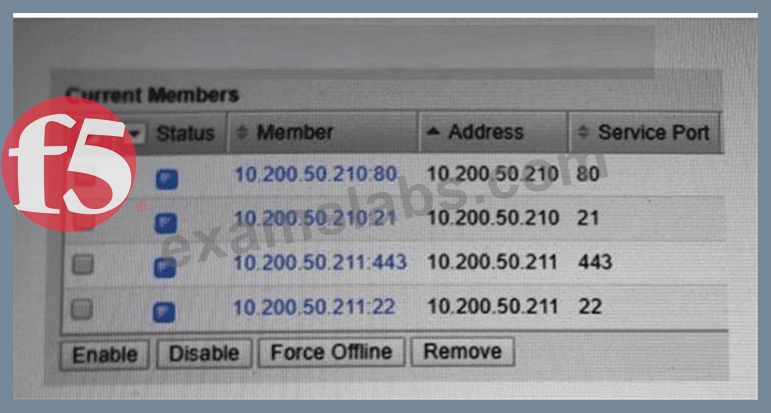
A BIG-IP Administrator needs to configure health monitors for a newly configured server pool named Pool_B.
Which health monitor settings will ensure that all pool members will be accurately marked as available or unavailable? (Choose one answer)
- A. HTTPS, HTTP, FTP, and SSH with the Availability Requirement of all health monitors
- B. HTTPS, HTTP, FTP, and SSH with the Availability Requirement of at least one health monitor
- C. HTTPS, HTTP, FTP, and SSH with the Availability Requirement of all health monitors
- D. HTTP, HTTPS, FTP, and ICMP with the Availability Requirement of at least one health monitor
Answer: B
Explanation:
From the exhibit, the pool contains different applications on different service ports (for example, HTTP/80, FTP/21, HTTPS/443, SSH/22). To mark pool members correctly, BIG-IP must be able to verify the actual service running on each member's port.
In BIG-IP Administration: Data Plane Configuration, monitor behavior is described as follows:
* When multiple monitors are assigned to a pool, the Availability Requirement controls how monitor results are evaluated:
* At least one = the pool member is marked up if any one of the assigned monitors succeeds.
* All = the pool member is marked up only if every assigned monitor succeeds.
* For pools containing members with different services/ports, using All can incorrectly mark members down because monitors intended for other services will fail on the wrong port.
Why C is correct:
* Assigning HTTPS, HTTP, FTP, and SSH covers the actual services shown in the pool.
* Setting the Availability Requirement to at least one ensures that each pool member is considered available when its appropriate service monitor succeeds, without being forced to pass unrelated service monitors.
Why the other options are incorrect:
* A / D (Availability Requirement = all): would cause members to be marked down when unrelated monitors fail (e.g., SSH monitor against an HTTP member).
* B (includes ICMP): ICMP can indicate the host is reachable even if the application service is down, which does not "accurately" reflect service availability.
Therefore, the best choice is HTTPS, HTTP, FTP, and SSH with Availability Requirement of at least one health monitor.
NEW QUESTION # 46
The BIG-IP Administrator has to provide encrypted communication between the users and the virtual server they access. Multiple hostnames are configured in DNS with the same IP address. Which profile type and setting in the profile should be used? (Choose one answer)
- A. Server SSL, Server Name
- B. Server SSL, Client Name
- C. Client SSL, Server Name
- D. Client SSL, Client Name
Answer: C
Explanation:
To provide encrypted communication between users and a virtual server, the BIG-IP system acts as a transparent SSL/TLS proxy. The administrative configuration required for this is a Client SSL profile.
When multiple hostnames (FQDNs) are associated with a single IP address, the system must determine which SSL certificate to present to the client during the initial TLS handshake. This is achieved using an extension of the TLS protocol called Server Name Indication (SNI).
The configuration logic is as follows:
* Profile Type: The Client SSL profile is responsible for terminating the SSL connection from the client (the user) to the BIG-IP system.
* The Setting: Within the Client SSL profile (under the "Advanced" view), there is a field specifically called Server Name. By entering the specific hostname (e.g., www.example.com) in this field, the BIG- IP system can match the hostname requested by the client in the ClientHello message to the correct profile.
* Implementation: The administrator typically creates multiple Client SSL profiles-one for each hostname-and assigns them all to the same virtual server. One of these profiles must be designated as the Default SSL Profile for SNI to handle requests where the client does not provide a hostname or provides one that does not match any specific profile.
By using the Client SSL profile and the Server Name setting, the BIG-IP system ensures that each user receives the correct certificate for the specific site they are trying to reach, even though all sites share a single virtual server IP.
NEW QUESTION # 47
A BIG-IP Administrator finds the following log entry: tmm tmm[714]: 011e0002:4: sweeper_update:
aggressive mode activated. Which action should the BIG-IP administrator take to mitigate this memory issue?
- A. Configure the virtual server to use Connection Mirroring
- B. Decrease the TCP profile Idle Timeout value
- C. Configure the redundant pair to be active-active
- D. Increase the TCP profile Idle Timeout value
Answer: B
Explanation:
The log message "aggressive mode activated" indicates that the BIG-IP's adaptive connection management system (the "Sweeper") has detected that the system's memory or connection limits are reaching a critical threshold. To protect the system from crashing due to memory exhaustion (OOM), the BIG-IP enters Aggressive Mode, where it begins to proactively and rapidly reap (close) idle connections to free up resources for new incoming traffic.
To mitigate this and return the system to a healthy state, the administrator needs to reduce the overall resource footprint of existing connections. Decreasing the TCP profile Idle Timeout value (Option B) is the most effective administrative action. In many environments, the default idle timeout is 300 seconds (5 minutes). If a large number of connections remain "open" in the BIG-IP connection table long after the clients have stopped sending data, they consume valuable TMM (Traffic Management Microkernel) memory. By lowering the timeout (e.g., to 60 or 120 seconds), the BIG-IP can expire and remove these inactive entries much sooner, preventing the connection table from bloating and triggering the Sweeper's aggressive mode.
Conversely, increasing the timeout (Option C) would exacerbate the problem by keeping "dead" connections in memory even longer. Connection Mirroring (Option D) actually increases memory usage because every connection must be duplicated on the standby peer. An active-active configuration (Option A) might spread the load but does not address the underlying resource management issue on the individual units. Therefore, tightening the idle timers is the standard procedural fix for memory pressure caused by high connection volumes.
NEW QUESTION # 48
The BIG-IP Administrator is investigating whether better TCP performance is possible for a virtual server.
Which built-in profile should be tried first? (Choose one answer)
- A. f5-tcp-progressive
- B. f5-tcp-mobile
- C. No option
- D. f5-tcp-legacy
Answer: A
Explanation:
BIG-IP provides several built-in TCP profiles optimized for different traffic patterns and network conditions.
When attempting to improve general TCP performance, the recommended starting point is f5-tcp-progressive.
According to the BIG-IP Administration: Data Plane Configuration documentation:
* f5-tcp-progressive is designed as a balanced, general-purpose TCP optimization profile.
* It dynamically adjusts TCP behavior to improve throughput and latency for most enterprise applications.
* It is the recommended first-choice profile when tuning TCP performance before moving to more specialized profiles.
Why the other options are incorrect:
* A. f5-tcp-legacyThis profile exists for backward compatibility and does not include modern TCP optimizations.
* C. f5-tcp-mobileThis profile is optimized specifically for high-latency, lossy mobile networks and is not suitable for general-purpose environments.
* D. No optionBIG-IP explicitly provides built-in TCP profiles for performance tuning; using none would forgo optimization opportunities.
Correct Resolution:
The administrator should first apply f5-tcp-progressive to evaluate potential TCP performance improvements before considering more specialized profiles.
NEW QUESTION # 49
A set of servers is used for an FTP application as well as an HTTP website via separate BIG-IP Pools. The server support team reports that some servers are receiving a lot more traffic than others. Which Load Balancing Method should the BIG-IP Administrator apply to even out the connection count?
- A. Ratio (Member)
- B. Least Connections (Node)
- C. Least Connections (Member)
- D. Ratio (Node)
Answer: B
Explanation:
Similar to the logic required for managing multi-service backend environments, the issue described-where servers hosting multiple protocols like FTP and HTTP are experiencing uneven distribution-stems from the BIG-IP's default behavior of treating each pool independently. If the administrator uses a member-based load balancing method, the BIG-IP distributes HTTP traffic regardless of how much FTP traffic that same physical server is currently processing.
To resolve this, the administrator must utilize the Least Connections (Node) method. By switching both the HTTP and FTP pools to this algorithm, the BIG-IP begins to make load balancing decisions based on the total combined connection count for the IP address of each server. When a new HTTP request arrives, the BIG-IP checks which server has the fewest total connections (including existing FTP sessions). This prevents a server that is already busy with long-lived FTP transfers from being overwhelmed by a sudden burst of HTTP requests.
Ratio methods (Options A and C) are static and rely on the administrator manually assigning weights to servers based on their perceived capacity; they do not adapt to real-time fluctuations in traffic volume across different pools. Least Connections (Member) (Option B) remains blind to the "cross-pool" traffic on the same hardware. Only the Node-based Least Connections approach provides the global visibility necessary to "even out" the total resource utilization across servers supporting multiple distinct applications.
NEW QUESTION # 50
The BIG-IP Administrator is investigating whether better TCP performance is possible for a virtual server.
Which built-in profile should be tried first? (Choose one answer)
- A. f5-tcp-progressive
- B. f5-tcp-mobile
- C. No option
- D. f5-tcp-legacy
Answer: A
Explanation:
BIG-IP provides several built-in TCP profiles optimized for different traffic patterns and network conditions. When attempting to improve general TCP performance, the recommended starting point is f5-tcp-progressive.
According to the BIG-IP Administration: Data Plane Configuration documentation:
f5-tcp-progressive is designed as a balanced, general-purpose TCP optimization profile.
It dynamically adjusts TCP behavior to improve throughput and latency for most enterprise applications.
It is the recommended first-choice profile when tuning TCP performance before moving to more specialized profiles.
Why the other options are incorrect:
A . f5-tcp-legacy
This profile exists for backward compatibility and does not include modern TCP optimizations.
C . f5-tcp-mobile
This profile is optimized specifically for high-latency, lossy mobile networks and is not suitable for general-purpose environments.
D . No option
BIG-IP explicitly provides built-in TCP profiles for performance tuning; using none would forgo optimization opportunities.
Correct Resolution:
The administrator should first apply f5-tcp-progressive to evaluate potential TCP performance improvements before considering more specialized profiles.
NEW QUESTION # 51
Where in the configuration utility should the BIG-IP Administrator verify the pool member currently assigned to a pool is on port 80?
- A. Local Traffic > Pools: Pool List. Select the pool in question, select Members tab, view the configured Health Monitor.
- B. Local Traffic > Pools: Pool List. Select the pool in question, select the Members tab, view the configured Service Port.
- C. Local Traffic > Nodes: Node List. Select the node in question, view the Health Monitor next to Configuration.
Answer: B
Explanation:
The BIG-IP Configuration Utility (GUI) organizes information hierarchically to allow for granular management of application objects. A Pool is a collection of backend servers (pool members) that provide the same service. To verify the specific network parameters-such as the IP address and the service port-of the servers within a pool, the administrator must navigate to the specific pool's configuration.
The standard procedural path to verify this is Local Traffic > Pools: Pool List, where the administrator selects the specific pool name. Once inside the pool's configuration, the Members tab displays a list of all IP addresses and service ports associated with that pool. Under the "Service Port" column, the administrator can confirm if the member is listening on port 80 (HTTP).
Options A and B are incorrect for this specific verification task. While Nodes (Option A) show the health of a physical server, a node represents only an IP address and does not have a "Service Port" associated with it until it is defined as a pool member. Verifying the Health Monitor (Option B) would tell the administrator how the system is checking the member's status, but it does not definitively show the port on which the member is actually receiving application traffic. In a BIG-IP environment, a pool member is uniquely identified by the combination of its Node IP and its Service Port, and the Members tab is the primary interface for managing and auditing these specific member attributes.
NEW QUESTION # 52
For a given Virtual Server, the BIG-IP must perform SSL Offload and negotiate secure communication over TLSv1.2 only. What should the BIG-IP Administrator do to meet this requirement?
- A. Configure a custom SSL Profile (Client) and select no TLSv1 in the options list
- B. Configure a custom SSL Profile (Server) and select no TLSv1 in the options list
- C. Configure a custom SSL Profile (Server) with a custom TLSv1.2 cipher string
- D. Configure a custom SSL Profile (Client) with a custom TLSv1.2 cipher string
Answer: D
Explanation:
To fulfill the requirement of "SSL Offload" limited to "TLSv1.2 only," the administrator must focus on the client-side of the connection. SSL Offload means the BIG-IP terminates the encrypted connection from the user, processes the traffic (often as plain text internally), and optionally sends it to the backend. The profile responsible for this termination and the initial negotiation with the client's browser is the Client SSL Profile.
A custom Client SSL Profile must be created because the default clientssl profile typically allows a broad range of protocols for compatibility (including TLS 1.0, 1.1, and 1.2). To restrict communication specifically to TLS 1.2, the administrator modifies the Ciphers string within the profile. Using a string such as DEFAULT:!SSLv3:!TLSv1:!TLSv1.1 or specifically defining TLSv1.2-only suites ensures that the BIG-IP will reject any handshake attempts from older, less secure protocols.
Server SSL Profiles (Options B and C) are used for the encryption between the BIG-IP and the backend nodes, which is not what is requested here. Simply selecting "no TLSv1" in an options list (Option D) is insufficient and often refers to older versions of the software; the modern and standard way to control protocol negotiation on a BIG-IP is through the precise application of Cipher Strings within the Client SSL profile. This ensures compliance with security standards like PCI-DSS while providing the offloading benefits to the backend infrastructure.
NEW QUESTION # 53
Refer to the exhibit.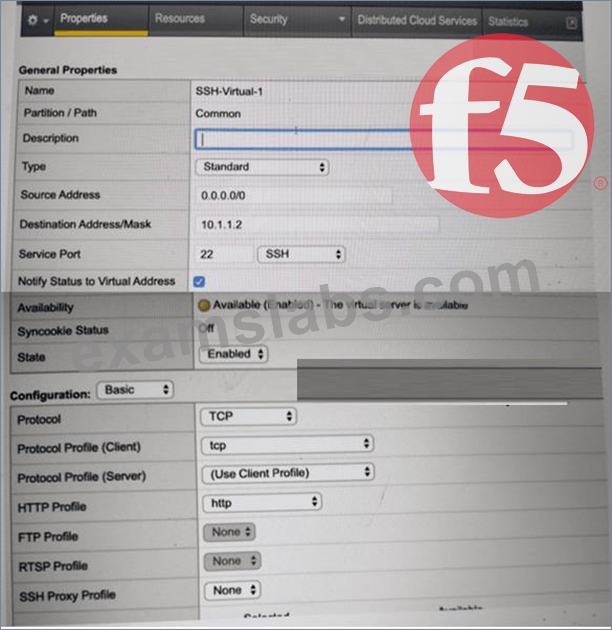
A BIG-IP Administrator creates a new Virtual Server to load balance SSH traffic. Users are unable to log on to the servers.
What should the BIG-IP Administrator do to resolve the issue? (Choose one answer)
- A. Set Destination Address/Mask to 0.0.0.0/0
- B. Set Protocol to UDP
- C. Set Source Address to 10.1.1.2
- D. Set HTTP Profile to None
Answer: D
Explanation:
SSH is a Layer 4 TCP-based protocol that operates on TCP port 22 and does not use HTTP in any capacity. In the exhibit, the Virtual Server is configured with an HTTP Profile applied, which is inappropriate for SSH traffic and causes connection failures.
According to the BIG-IP Administration: Data Plane Configuration documentation:
An HTTP profile must only be applied to Virtual Servers handling HTTP or HTTPS traffic.
When an HTTP profile is attached, BIG-IP expects HTTP headers and attempts to parse application-layer data.
Non-HTTP protocols such as SSH, FTP (control), SMTP, and other raw TCP services will fail if an HTTP profile is enabled.
Why the other options are incorrect:
A . Set Protocol to UDP
SSH uses TCP, not UDP. Changing the protocol would break SSH entirely.
B . Set Source Address to 10.1.1.2
The source address setting controls client access restrictions and is unrelated to protocol parsing issues.
C . Set Destination Address/Mask to 0.0.0.0/0
The destination address is already valid for a specific SSH service and does not impact protocol handling.
Correct Resolution:
The BIG-IP Administrator should remove the HTTP Profile (set it to None) so the Virtual Server functions as a pure Layer 4 TCP service, allowing SSH connections to pass through successfully.
NEW QUESTION # 54
Which of the following has iApp configured objects?
- A. ltm virtual /Common/app1_vs {creation-time 2020-02-07:09:47:12description https://app1.apmsupport.
localdestination /Common/10.155.47.160:443ip-protocol tcplast-modified-time 2024-05-15:09:57:
19mask 255.255.255.255pool /Common/https_lamp_poolprofiles {/Common/apm_support {context clientside}/Common/f5-tcp-progressive {}/Common/http {}/Common/multi_domain_ap {}/Common
/oneconnect {}/Common/rba {}/Common/serverssl {context serverside}/Common/websso {}}serverssl- use-sni disabledsource 0.0.0.0/0source-address-translation {type automap}translate-address enabledtranslate-port enabled} - B. ltm virtual /Common/vmware_test.app/vmware_test_proxy_https {app-service /Common/vmware_test.
app/vmware_testcreation-time 2024-04-12:08:49:12destination /Common/10.155.47.199:443ip- protocol tcplast-modified-time 2024-04-12:08:49:12mask 255.255.255.255profiles {/Common/ppp {}
/Common/rba {}/Common/vdi {}/Common/vmware_test.app/vmware_test {}/Common/vmware_test.
app/vmware_test_client_ssl {context clientside}/Common/vmware_test.app/vmware_test_connect
{context clientside}/Common/vmware_test.app/vmware_test_http {}/Common/vmware_test.app
/vmware_test_lan_optimized_tcp {context serverside}/Common/vmware_test.app
/vmware_test_server_ssl {context serverside}/Common/vmware_test.app
/vmware_test_wan_optimized_tcp {context clientside}/Common/websso {}}serverssl-use-sni disabledsource 0.0.0.0/0source-address-translation {type automap}translate-address enabledtranslate- port enabled} - C. ltm virtual /Common/test_vs {creation-time 2023-09-01:12:28:27destination /Common/10.176.21.11:
443disabledip-protocol tcplast-modified-time 2023-09-01:12:29:40mask 255.255.255.255profiles {
/Common/fastL4 {}}serverssl-use-sni disabledsource 0.0.0.0/0translate-address enabledtranslate-port enabled} - D. ltm virtual /Common/app2_vs {creation-time 2020-02-07:09:48:01description https://app2.apmsupport.
localdestination /Common/10.155.47.161:443ip-protocol tcplast-modified-time 2024-05-13:06:02:
40mask 255.255.255.255pool /Common/https_lamp_poolprofiles {/Common/apm_support {context clientside}/Common/f5-tcp-progressive {}/Common/http {}/Common/multi_domain_ap {}/Common
/rba {}/Common/serverssl {context serverside}/Common/websso {}}serverssl-use-sni disabledsource
0.0.0.0/0source-address-translation {type automap}translate-address enabledtranslate-port enabled}
Answer: B
Explanation:
An F5 iApp is a template-driven system used to deploy complex applications by grouping all necessary BIG- IP objects (Virtual Servers, Pools, Profiles) into a single management entity. Objects created by an iApp are distinguished by their naming convention and metadata. In the provided exhibit, the Virtual Server configuration in Option A is clearly identified as an iApp-managed object through two primary indicators.
First, the object resides within a sub-directory or partition ending in .app (/Common/vmware_test.app/).
Second, the configuration explicitly includes the attribute app-service /Common/vmware_test.app
/vmware_test, which serves as the system's internal pointer linking the LTM object back to the parent iApp Application Service. Furthermore, several profiles associated with this virtual server also reside within the same .app container, such as /Common/vmware_test.app/vmware_test_http.
In contrast, Options B, C, and D represent standard, manually created Virtual Servers. While they may have complex configurations (such as the APM profiles in app2_vs and app1_vs), they lack the folder-based naming hierarchy and the app-service metadata attribute that denotes iApp ownership. Standard objects like app1_vs are managed individually, whereas the objects within vmware_test.app are typically protected by
"Strict Updates." This means their configuration is controlled by the iApp's template logic; any manual attempt to modify these specific parameters directly via the Virtual Server menu would result in an error message stating the service must be updated via the application management interface. Identifying these objects is a critical procedural step for administrators to determine whether a configuration should be edited through the standard LTM menus or through the iApp's "Reconfigure" tab to ensure consistency and prevent manual changes from being overwritten by the template.
NEW QUESTION # 55
Which persistence profile would be the most appropriate to ensure an HTTP web request connects to the same pool member? (Choose one answer)
- A. Destination address
- B. Cookie persistence
- C. Hash persistence
- D. SSL persistence
Answer: B
Explanation:
For HTTP-based applications, cookie persistence is the most appropriate and commonly recommended persistence method.
According to the BIG-IP Administration: Data Plane Configuration documentation:
Cookie persistence inserts or uses an HTTP cookie to maintain session affinity.
It operates at Layer 7 (HTTP) and is application-aware.
It allows persistence to be maintained even when multiple clients are behind a NAT device.
Why the other options are incorrect:
A). Destination addressDestination address persistence is generally used for inbound traffic patterns such as firewall or proxy scenarios.
B). Hash persistenceHash persistence is less granular and not HTTP-specific.
C). SSL persistenceSSL persistence is typically used when SSL session IDs are reused and is less reliable than cookies for HTTP applications.
Correct Resolution:
Using cookie persistence ensures that HTTP web requests are consistently directed to the same pool member.
NEW QUESTION # 56
A BIG-IP Administrator uses backend servers to host multiple services per server. There are multiple virtual servers and pools defined, referencing the same backend servers.
Which load balancing algorithm is most appropriate to have an equal number of connections on each backend server? (Choose one answer)
- A. Least Connections (node)
- B. Least Connections (member)
- C. Predictive (node)
- D. Predictive (member)
Answer: A
Explanation:
In this scenario, each backend node (server) hosts multiple services and is referenced by multiple pools and virtual servers. The goal is to ensure an equal number of total connections per backend server, regardless of how many pool members (services/ports) exist on that server.
According to the BIG-IP Administration: Data Plane Configuration documentation:
Least Connections (node) tracks the total number of active connections to a node across all pool members and services.
This algorithm ensures load distribution is balanced at the server level, not just at the individual service (member) level.
It is specifically recommended when:
Multiple pool members exist on the same backend server
Multiple virtual servers reference the same backend servers
Why the other options are incorrect:
B . Predictive (member)
Predictive algorithms are advanced and traffic-pattern based, but they operate at the member level and do not guarantee equal connections per server.
C . Least Connections (member)
This balances connections per pool member, which can overload a server hosting multiple members while still appearing "balanced" per member.
D . Predictive (node)
Although node-aware, predictive algorithms are less deterministic and not the best choice when strict equality of connections is required.
Correct Resolution:
Using Least Connections (node) ensures that each backend server carries an equal connection load across all services and pools.
NEW QUESTION # 57
......
Read Online F5CAB3 Test Practice Test Questions Exam Dumps: https://www.examslabs.com/F5/F5-CA/best-F5CAB3-exam-dumps.html